
Honda Fit: Secondary HO2S Replacement
Second generation (2007-2026) / Honda Fit 2007-2026 Repair Manual / Powertrain / Internal Combustion Powertrain Control / Engine Control / Engine Control Sensors / Secondary HO2S Replacement
Special Tools Required
- O2 Sensor Wrench Snap-on S6176 or equivalent, commercially available
-
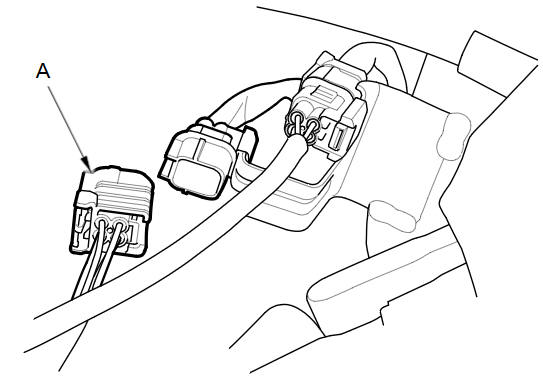
Disconnect the secondary HO2S connector (A).
-
Raise the vehicle on a lift.
-
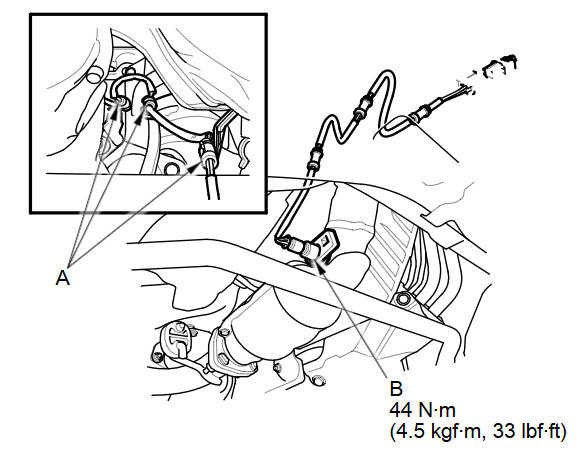
Remove the supporters (A), then remove the secondary HO2S (B).
-
Install the parts in the reverse order of removal.
See also:
Fluid Locations
...
Adding Waypoints
Add up to four waypoints (pit stops) along the route to your destination.
Waypoints allow you to stop for gas or food, for
example, and then continue on to your
destination.
Press the MAP/GUID ...
Intermediate Shaft Removal (A/T)
Drain the transmission fluid. Reinstall the drain plug with a new sealing
washer.
Remove the right driveshaft.
Remove the shift cable cover (A).
Re ...
Categories

© 2026 Copyright www.hfitinfo.com