
Honda Fit: Valve Body and ATF Strainer Removal (A/T)
-
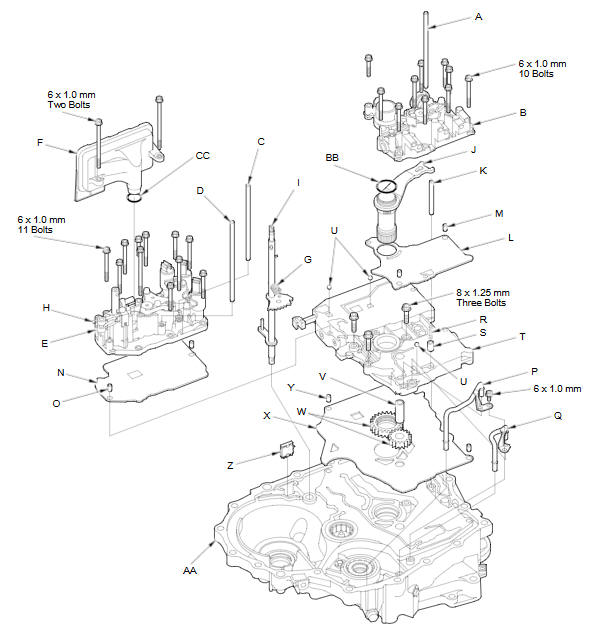
Remove the ATF feed pipe (A) from the regulator valve body (B).
-
Remove the ATF feed pipes (C) (D) from the servo body (E).
-
Remove the ATF strainer (F) (two bolts).
-
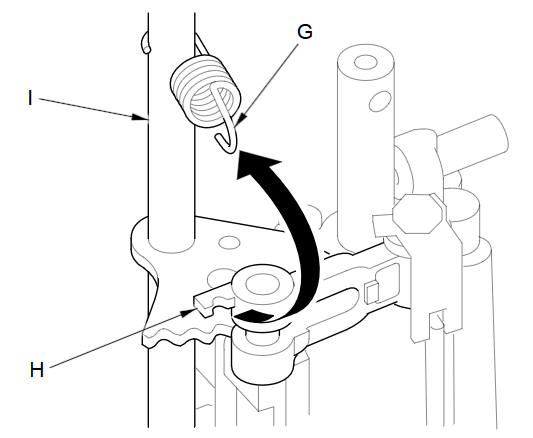
Unhook the detent spring (G) from the detent arm (H), and remove the control shaft (I).
-
Remove the regulator valve body (10 bolts).
-
Remove the stator shaft (J) and stator shaft stop (K), then remove the regulator separator plate (L) and two dowel pins (M).
-
Remove the servo body (11 bolts), then remove the separator plate (N) and two dowel pins (O).
-
Remove the ATF joint pipes (P) (Q).
-
Remove the cooler check valve spring (R) and cooler check valve (S), then remove the main valve body (T) (three bolts). Do not let the check balls (U) fall out.
-
Remove the ATF pump driven gear shaft (V), then remove the ATF pump gears (W).
-
Remove the main separator plate (X) and two dowel pins (Y).
-
Remove the ATF magnet (Z), clean and reinstall it in the torque converter housing (AA).
-
Remove the O-ring (BB) from the stator shaft, and remove the O-ring (CC) from the ATF strainer. Install new ones when installing the valve bodies.
-
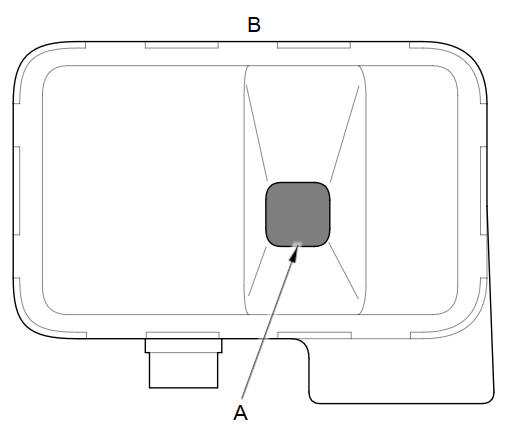
Clean the inlet opening (A) of the ATF strainer (B) thoroughly with compressed air, then check that it is in good condition and that the inlet opening is not clogged.
-
Test the ATF strainer by pouring clean ATF through the inlet opening, and replace it if it is clogged or damaged.
See also:
Registering a Voice Tag to a Speed Dial Entry
PHONE button
► Speed Dial 1 or Speed Dial 2
1. Select a speed dial entry.
2. Select Edit Speed Dial.
3. Select Voice Tag.
4. Follow the prompt to enter a voice
tag.
Voice tags allow ...
Receiver/Dryer Desiccant Replacement (With A/C)
NOTE: Install the receiver/dryer as quickly as possible to prevent the system
from absorbing moisture from the air.
Remove the A/C condenser.
Remove the bolts from the A/C cond ...
What to Do If
The ignition switch does
not turn from to
.
Why?
● The steering wheel may be locked.
● Try to turn the steering wheel left and right
while turning the ignition key.
The i ...
Categories
