
Honda Fit: Throttle Body Disassembly/Reassembly
Second generation (2007-2026) / Honda Fit 2007-2026 Repair Manual / Powertrain / Internal Combustion Powertrain Control / Engine Control / Air Metering/Acceleration / Throttle Body Disassembly/Reassembly
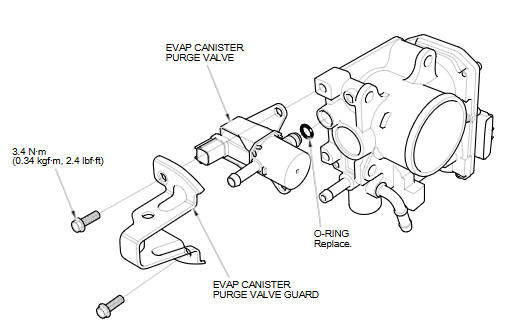
See also:
CKP Sensor Replacement
Raise the vehicle on a lift.
NOTE: Make sure the vehicle is level, because engine oil will drip out
when you remove the sensor.
Loosen the bolt (A). Remove the bolt (B) and ...
Auxiliary Input Jack
U.S. Sport and all Canadian models
The auxiliary input jack is underneath the accessory power socket in the center
pocket. The system will accept auxiliary input from standard audio accessories.
...
Visual Index
...
Categories

© 2026 Copyright www.hfitinfo.com