
Honda Fit: Accelerator Pedal Module Removal/Installation
-
Remove the driver's dashboard lower cover.
-
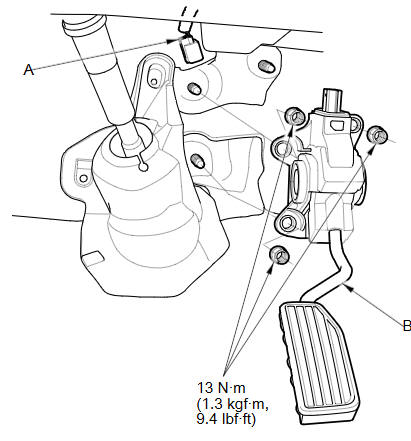
Disconnect the APP sensor connector (A).
-
Remove the accelerator pedal module (B).
NOTE:
-
The APP sensor is not available separately. Do not disassemble the accelerator pedal module.
-
If the accelerator pedal module is dropped, replace it.
-
-
Install the parts in the reverse order of removal.
See also:
If the TPMS Indicator Comes
U.S. models
■ Reasons for the indicator to come on
• Comes on when there is a problem with the TPMS.
• If the compact spare is installed, the indicator comes on after driving
for a few ...
Control Locations
* : If equipped ...
Instrument Panel
Gauges/Information Display/System Indicators
Lights Reminders
System Indicators
System Indicators
System Indicators
System Indicators
...
Categories
