
Honda Fit: Control Locations
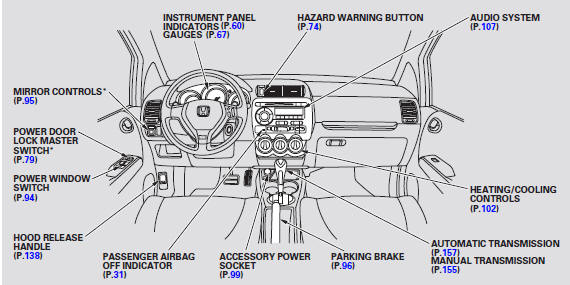
* : If equipped
See also:
Towing Your Vehicle Behind a Motorhome
Your vehicle can be towed behind a motorhome at legal highway speeds up to 65
mph (100 km/h). Do not exceed 65 mph (100 km/h).
Otherwise, severe transmission damage will occur.
When purchasing a t ...
Handles and Remote Openers
Rear Door Outer Handle Replacement
Special Tools Required
KTC Trim Tool Set SOJATP2014
*Available through the Honda Tool and Equipment Program; call 888-424-6857
NOTE:
Put on glove ...
A/T Differential Carrier Bearing Preload Inspection (A/T)
Special Tools Required
Driver Handle, 15 x 135L 07749-0010000
Bearing Driver Attachment, 72 x 75 mm 07746-0010600
Preload Inspection Tool 07HAJ-PK40201
NOTE: If the transmission housing, torq ...
Categories
