
Honda Fit: Rocker Arm Assembly Removal
-
Remove the cylinder head cover.
-
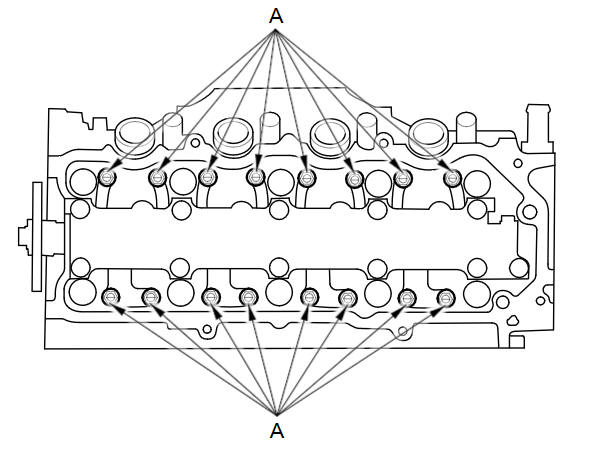
Loosen the rocker arm adjusting screws (A).
-
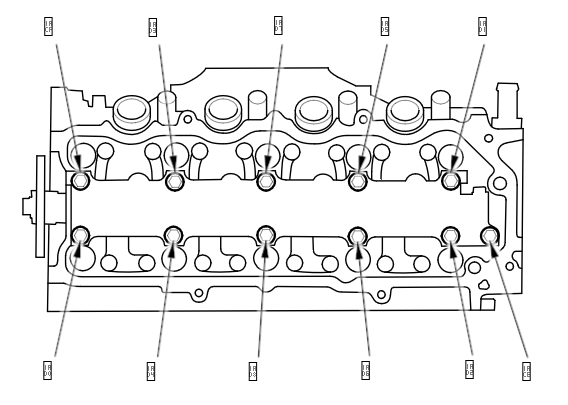
Unscrew the rocker shaft mounting bolts two turns at a time in the sequence shown.
-
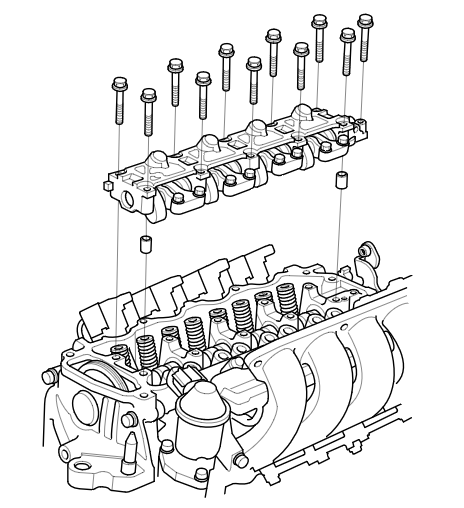
Remove the rocker shaft mounting bolts, then remove the rocker arm assembly.
See also:
Guidance Screen
...
Rear Seat-Back Cover/Pad Replacement
Special Tools Required
KTC Trim Tool Set SOJATP2014
*Available through the Honda Tool and Equipment Program; call
888-424-6857
NOTE:
Use the appropriate tool from the KTC trim to ...
Under-Dash Fuse/Relay Box Removal and Installation (Canada models)
Canada models
NOTE: SRS components are located in this area.
Review the SRS component locations, and
precautions and procedures
before doing repairs or servicing.
Removal
NOTE: The ...
Categories
