
Honda Fit: Transmission Side - Release Bearing Installation
-
Apply high temp urea grease (P/N 08798-9002) to the release fork (A), the release fork bolt (B), the release bearing (C), and the release bearing guide (D) in the shaded areas, then set the release fork set spring (E).
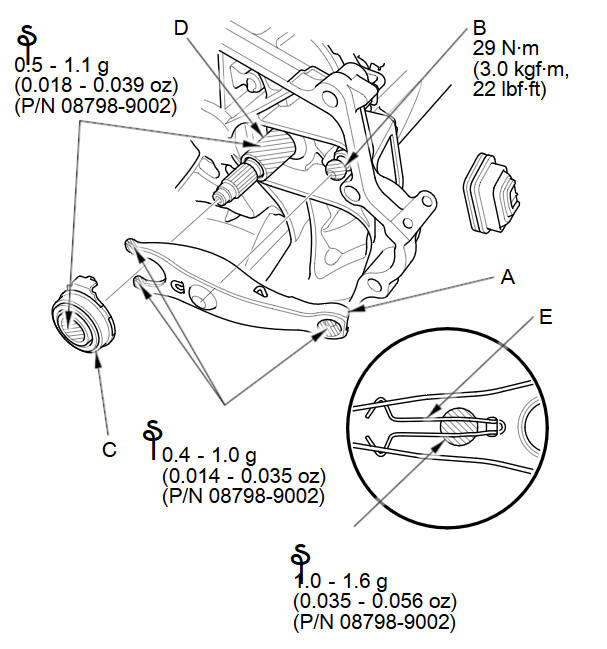
NOTE: Replace the release fork bolt if necessary.
-
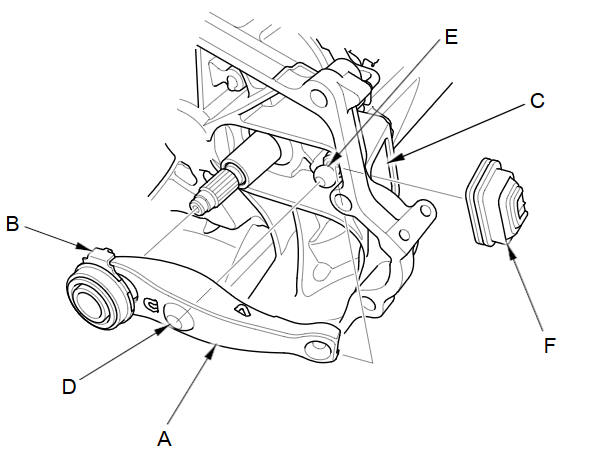
With the release fork (A) slid between the release bearing pawls (B), install the release bearing on the mainshaft while inserting the release fork through the hole (C) in the clutch housing.
-
Align the detent (D) of the release fork with the release fork bolt (E), then press the detent of the release fork over the release fork bolt squarely.
-
Install the release fork boot (F). Make sure the boot seals around the release fork and clutch housing.
-
Move the release fork (A) right and left to make sure that it fits properly against the release bearing (B), and that the release bearing slides smoothly.
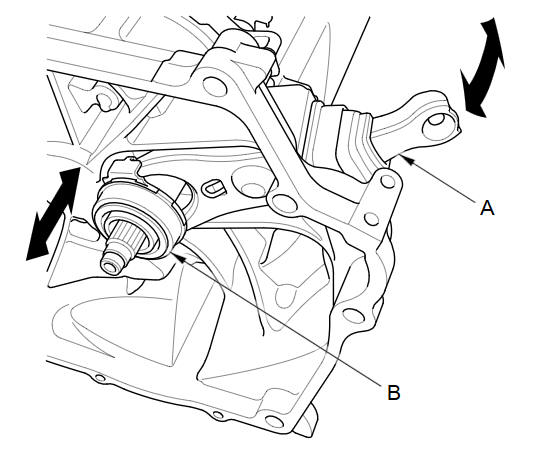
NOTE: Wipe off any excess grease.
-
Install the transmission.
See also:
Winter Tires
If driving on snowy or frozen roads, mount all season marked “M+S” tires,
snow
tires, or tire chains; reduce speed; and maintain sufficient distance between
vehicles
when driving.
Be part ...
Intermediate Shaft Reassembly (A/T)
Exploded View
Special Tools Required
Oil Seal Driver, 65 mm 07JAD-PL90100
Bearing Driver Attachment, 52 x 55 mm 07746-0010400
Bearing Driver Attachment, 35 mm I.D. 07746-0030400
Drive ...
Playing an iPod®
Connect the iPod® using your dock connector to the USB adapter cable, then
press
the AUX button.
■How to Select a File from the iPod® Menu
1. Press to display the iPod®
menu.
2. ...
Categories
