
Honda Fit: A/T Countershaft Reverse Selector Hub Installation (A/T)
Special Tools Required
- Driver Handle, 40 mm I.D. 07746-0030100
-
Install 1st gear, 2nd gear, 3rd gear, the 33.2 x 40 x 26 mm collar, the 29 mm cotters, and the 33 x 45 x 7.8 mm collar on the countershaft, and secure them with the snap ring.
-
Install the needle bearings and the 4th-5th gear.
-
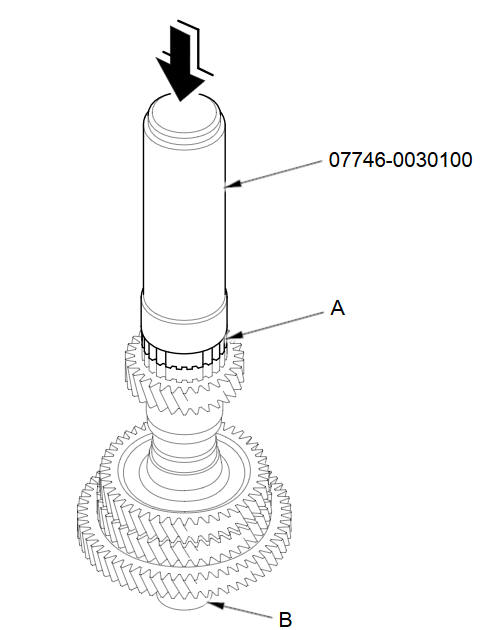
Slide the reverse selector hub (A) over the countershaft (B), then press it in place using the driver handle (40 mm I.D.) and a press.
NOTE: Some reverse selector hubs are not press-fitted, and can be installed without using the a press.
See also:
Update, Coverage, Map Errors
...
Letters
...
General Commands
Display menu (if en route, displays the
Route screen)
Display navigation (if en route, displays
the Route screen)
Display map
Display map guide (when en route,
shows the next guidance point)
Di ...
Categories
