
Honda Fit: Clutch Pedal Position Switch Replacement (With Cruise Control(M/T))
-
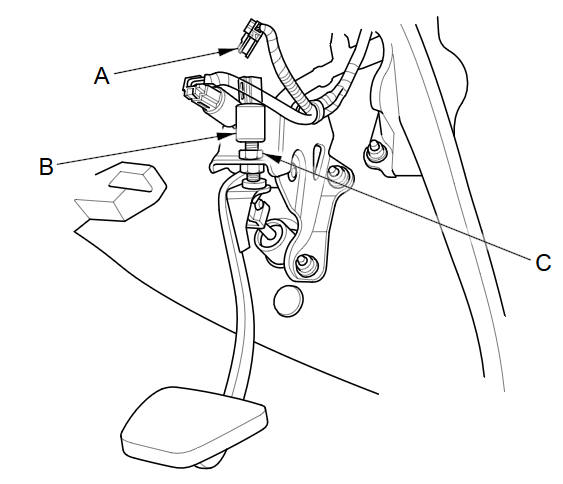
Disconnect the 2P connector (A) from the clutch pedal position switch (B).
-
Loosen the locknut (C), then remove the clutch pedal position switch.
-
Install the clutch pedal position switch, and adjust the pedal height.
See also:
Hood Adjustment
NOTE:
Put on gloves to protect your hands.
Take care not to scratch the hood, the body, or other related parts.
Remove the cowl cover.
Slightly loosen each bo ...
Intersection
DEST button
►DEST Menu 2►Intersection
Select the intersection of two streets as the destination. The state or
province for
your current location is displayed at the top of the screen ...
Front Seat Removal/Installation
Special Tools Required
KTC Trim Tool Set SOJATP2014
*Available through the Honda Tool and Equipment Program; call
888-424-6857
Click here for an interactive version of this procedure (d ...
Categories
