
Honda Fit: Power Windows
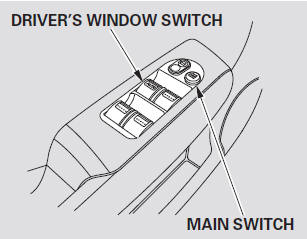
Turn the ignition switch to the ON (II) position to raise or lower any window. To open the window, push the switch down and hold it. Release the switch when you want to stop the window. To close the window, pull back on the switch and hold it.

AUTO -
To open the driver’s window fully, push the window switch firmly down to the second detent, and release it. The window will automatically go down all the way. To stop the window, pull back on the window switch briefly.
To close the window, pull back on the switch and hold it.
When you push the MAIN switch in, the switch is off, and the passenger windows cannot be raised or lowered.
To cancel this feature, push on the switch again to get it to pop out.
Keep the MAIN switch off when you have children in the vehicle so they do not injure themselves by operating the windows unintentionally.
See also:
Inspection
Install the nut on the damper shaft end, and set the socket wrench and
T-handle on the nut.
Compress the damper assembly by hand, and check for smooth operation
through a full ...
Inspection and Maintenance
For your safety, perform all listed inspections and maintenance to keep your
vehicle
in good condition. If you become aware of any abnormality (noise, smell,
insufficient
brake fluid, oil residu ...
Before Driving
Before you begin driving your vehicle, you should know what gasoline to use and
how to check the levels of important fluids. You also need to know how to properly
store luggage or packages. The in ...
Categories
