
Honda Fit: Flywheel Replacement
-
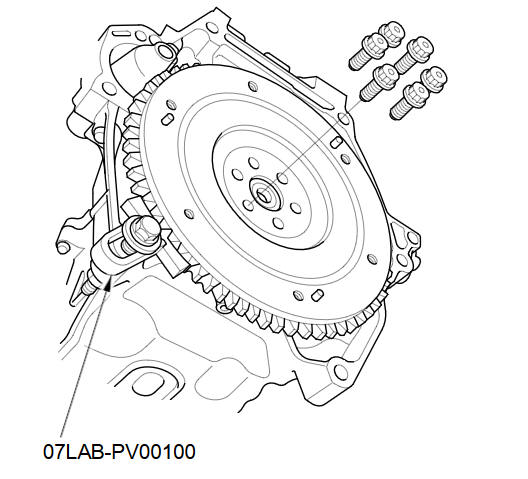
Install the ring gear holder.
-
Loosen the flywheel mounting bolts in a crisscross pattern in several steps. Remove the bolts, then remove the flywheel and the ring gear holder.
-
Install the flywheel on the cranksha9t, and install the mounting bolts finger-tight.
-
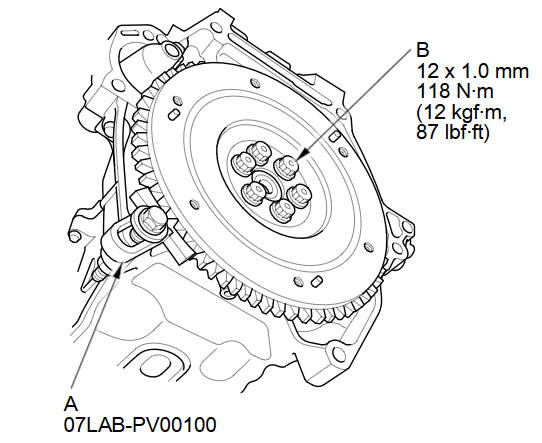
Install the ring gear holder (A), then tighten the flywheel mounting bolts (B) in a crisscross pattern in several steps.
See also:
Recirculation Control Cable Adjustment
Open the glove box. Release the glove box stop on each side, then
let the glove box hang down.
Set the recirculation control lever to FRESH ().
Detach the recirculation ...
VIN, Engine, (Motor), Transmission Numbers, and Paint Codes
Vehicle Identification Number
a.
Manufacturer, Make, and Type of Vehicle
JHM:
Honda Motor Co., Ltd.
Honda passe ...
Power Mirror Actuator Replacement
Removal
Remove these items:
Mirror holder
Power mirror
Record the power mirror connector terminals location and the wire harness
colors. ...
Categories
