
Honda Fit: Shift Solenoid Valve Removal and Installation (A/T)
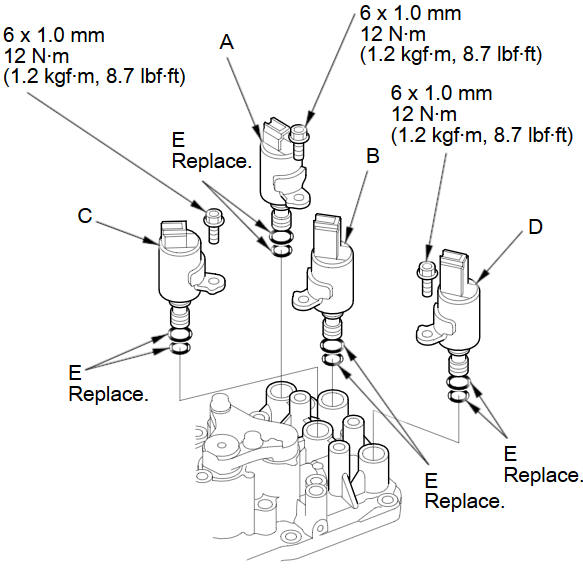
NOTE: Do not hold the solenoid valve connector to remove and install the solenoid valve. Be sure to hold the solenoid valve body.
-
Remove the mounting bolts, then remove the solenoid valves by holding the solenoid valve body.
-
Install new O-rings (E) on each solenoid valve.
NOTE: A new solenoid valve comes with new O-rings. If you install a new solenoid valve, use the O-rings provided with it.
-
Install shift solenoid valve D (black connector) by holding the shift solenoid valve body; be sure the mounting bracket contacts to the servo body.
-
Install shift solenoid valve C (brown connector) by holding the shift solenoid valve body; be sure the mounting bracket contacts to the servo body.
-
Install shift solenoid valve B (black connector) by holding the shift solenoid valve body; be sure the mounting bracket contacts to the servo body.
-
Install shift solenoid valve A (brown connector) by holding the shift solenoid valve body; be sure the mounting bracket contacts to the bracket of shift solenoid valve B.
NOTE: Do not install shift solenoid valve A before installing shift solenoid valve B. If shift solenoid valve A is installed before installing shift solenoid valve B, it may damage the hydraulic control system.
See also:
Camshaft Inspection
Remove the camshaft sprocket.
Remove the rocker arm assembly, then disassemble the rocker arm.
Put the rocker shaft holder bridge on the cylinder head, then tight ...
Piston, Pin, and Connecting Rod Replacement
Special Tools Required
Pilot Pin 070AF-PWC0110
Piston Base 07973-6570500
Piston Base Spring 07973-6570600
Piston Base Head 07TGF-001000A
Pilot Collar, O.D. 18 mm 070AF-PWC0130
Insert Adj ...
Installing a Child Seat
After selecting a proper child seat and a good place to install the seat, there
are three main steps in installing the seat:
1. Properly secure the child seat to the vehicle. All child seats must
...
Categories
