
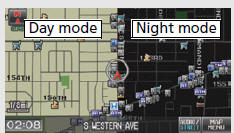
Honda Fit: Day or Night Mode
Press the  (Display mode) button
to manually switch between day and
night mode.
See also:
Transmission End Cover ATF Feed Pipe Replacement (A/T)
Remove the snap ring (A), the 3rd clutch feed pipe (B), and the feed pipe
flange (C) from the end cover (D).
Install a new O-ring (E) over the 3rd clutch feed pipe.
In ...
Fuel Economy
Improving Fuel Economy
Fuel economy depends on several conditions, including driving conditions,
your
driving habits, the condition of your vehicle, and loading. Depending on these
and
other co ...
Passenger's Power Window Switch Replacement
NOTE: The illustration shows front passenger's power window switch.
Remove the door panel:
Front passenger's
Rear
Remove the screws and t ...
Categories
