
Honda Fit: Drive Belt Inspection
-
Inspect the belt for cracks or damage. If the belt is cracked or damaged, replace it.
-
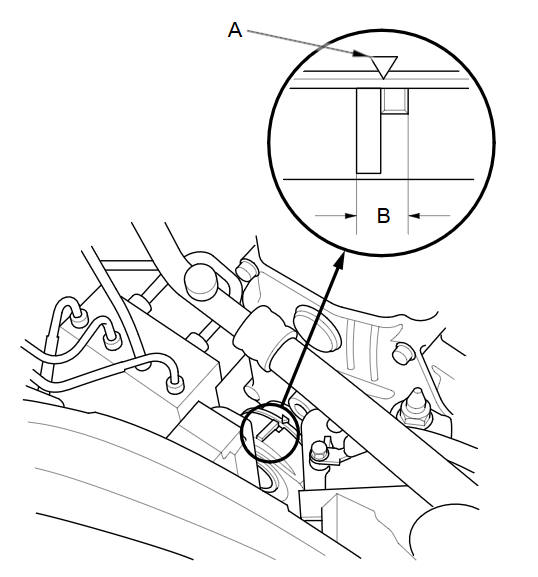
Check that the position of the auto-tensioner indicator (A) is within the standard range (B) as shown. If it is out of the standard range, replace the drive belt.
See also:
Map Matching
Map matching is the process of using the
acquired GPS information to locate your
position on the map screen. If you are on a
mapped road, the name of the road is
displayed along the bottom of the ...
Interior Rearview Mirror
Adjust the angle of the rearview mirror when you are sitting in the correct
driving
position.
■Rearview Mirror with Day and Night Positions
Flip the tab to switch the position.
The nig ...
Removal
Raise and support the vehicle.
Remove the rear wheel.
Remove the wire guide grommet (A) from both sides of the axle beam.
@font-face ...
Categories
