
Honda Fit: Air Cleaner Removal/Installation
-
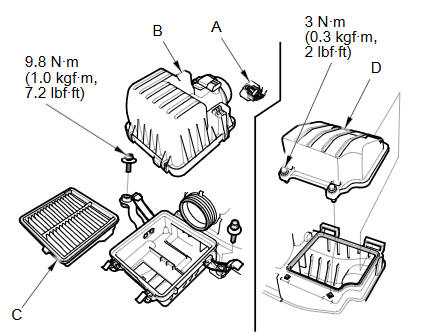
Disconnect the MAF sensor/IAT sensor connector(A), then remove the air cleaner cover (B) and the air cleaner element (C).
NOTE: Be careful not to damage the MAF sensor/IAT sensor on the air cleaner cover.
-
Remove the air cleaner chamber (D).
-
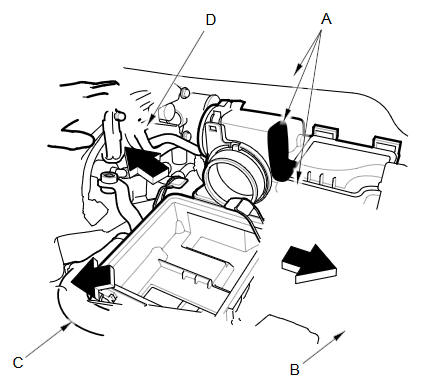
Apply protective tape to the air cleaner, the cowl cover, and the battery terminal fuse box (A) as shown.
-
Remove the battery hold down, and reposition the battery (B). Reposition the radiator upper hose (C), and the breather pipe (D) as shown.
NOTE: Do not disconnect the battery terminals.
-
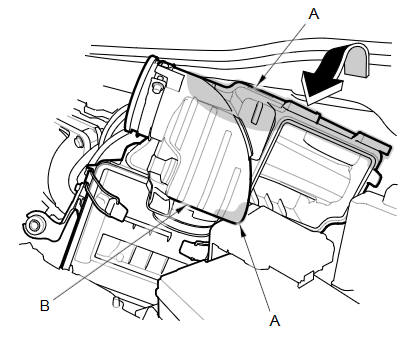
Apply protective tape to the air cleaner (A) as shown.
-
Turn the air cleaner (B) case as shown.
-
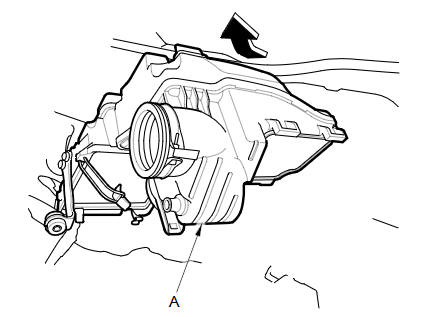
Remove the air cleaner case (A) as shown.
-
Install the parts in the reverse order of removal.
See also:
Operation in Alaska, Hawaii, Canada, and Puerto Rico
Map Coverage
All roads displayed on the map screens are
verified roads. Information in this manual
relating to “unverified” roads or areas is
not applicable.
Address and Place Entry
Screens
...
Shift Cable Adjustment (A/T)
Remove the center console.
Shift the transmission to N.
Remove the nut securing the shift cable end.
Rotate the socket holder (A) on the shift cable ( ...
Gauges
TripMeter
This meter shows the number of miles (U.S.) or kilometers (Canada) driven since
you last reset it.
There are two trip meters: Trip A and Trip B. Switch between these displays by
pres ...
Categories
