
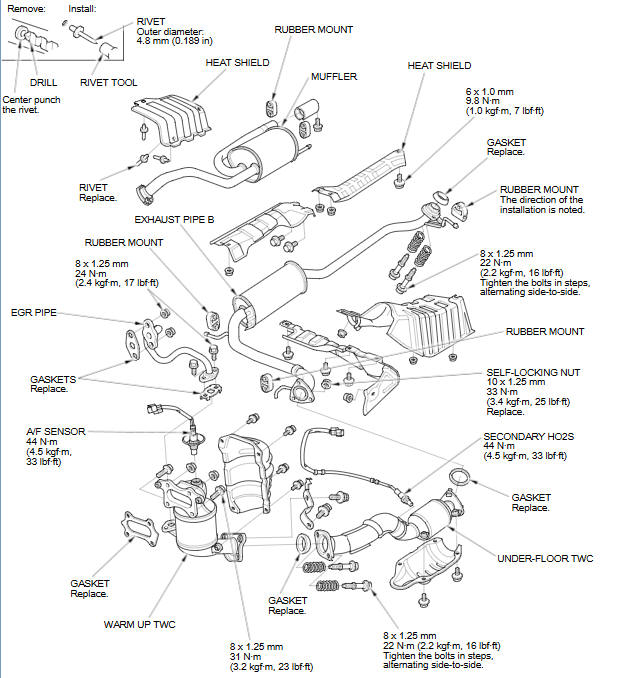
Honda Fit: Exhaust Pipe and Muffler Replacement
Second generation (2007-2026) / Honda Fit 2007-2026 Repair Manual / Powertrain / Engine / General / Exhaust Pipe and Muffler Replacement
NOTE: Use new gaskets and self-locking nuts when reassembling.
See also:
Setting Up Speed Dialing
PHONE button
► Speed Dial 1 or Speed Dial 2
Create speed dial entries with voice tags for easy calling.
1. Select Add New.
2. Select a number entry option.
3. Select a number.>
4. ...
CMP Pulse Plate Removal and Installation
Removal
Remove the air cleaner.
Remove the intake manifold chamber.
Disconnect the following engine wire harness connectors, and remove the
wire harness clamps ...
About Your Audio System
The audio system features FM/AM radio. It can also play audio discs, WMA/M/
AAC tracks, iPods®, USB flash drives, and Bluetooth® devices.
The audio system is operable from the buttons and switch ...
Categories

© 2026 Copyright www.hfitinfo.com