
Honda Fit: Front Turn Signal Light Bulbs
When replacing, use the following bulbs.
Front Turn Signal Light: 21 W (Amber)
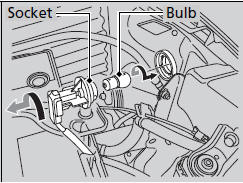
1. Turn the socket to the left and remove it.
2. Push in the old bulb, rotate to the left until it unlocks, and remove.
3. Insert a new bulb.
See also:
Manual transmission models Shifting
■Shift Lever Operation+
Fully depress the clutch pedal to operate the shift lever and change gears,
then
slowly release the pedal.
Depress the clutch pedal, and pause for a few seconds be ...
Dashboard/Steering Hanger Beam Disassembly/Reassembly (Page-1)
Special Tools Required
KTC Trim Tool Set SOJATP2014
*Available through the Honda Tool and Equipment Program; call 888-424-6857
NOTE:
Put on gloves to protect your hands.
...
Brake and Clutch Fluid
Check the brake fluid level in the reservoirs monthly.
Replace the brake fluid according to the time recommendation in the maintenance
minder schedule.
Always use Honda Heavy Duty Brake Fluid DOT ...
Categories
