
Honda Fit: Heating and Cooling
Using Vents, Heating and A/C
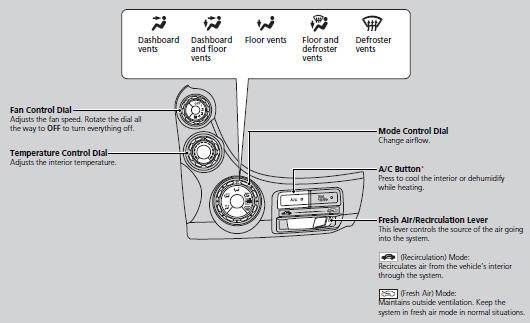
■Heating
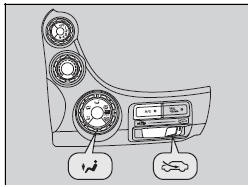
The heater uses heat from the engine coolant to warm the air.
1. Adjust the fan speed using the fan control dial.
2. Select  and
and
 .
.
3. Adjust the temperature using the
temperature control dial.
■ To rapidly warm up the interior
1. Set the fan to the maximum speed.
2. Select .
3. Set the temperature to maximum heat.
4. Select  .
.
Change to fresh air mode as soon as the interior gets warm enough. The windows may fog up if kept in recirculation mode.
■ To dehumidify the interior*
When used in combination with the heater, the air conditioning system makes the interior warm and dry and can prevent the windows from fogging up.
1. Turn the fan on.
2. Press the A/C button to turn on the air conditioning.
3. Select and
. Adjust the temperature to your
preference.
■Cooling
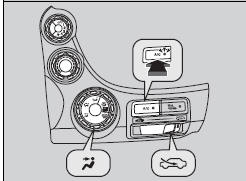
1. Adjust the fan speed using the fan control dial.
2. Select  and
.
and
.
3. Adjust the temperature using the
temperature control dial.
4. Press the A/C button (the indicator on).
■ To rapidly cool down the interior
1. Set the fan to the maximum speed.
2. Set the temperature to maximum cool.
3. Select .
If the interior is very warm, you can cool it down more rapidly by partially opening the windows.
■Defrosting the Windshield and Windows
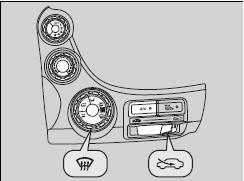
1. Select  turns the air
conditioning system
on.
2. Select .
■ To rapidly defrost the windows
1. Set the fan to the maximum speed.
2. Select  .
.
3. Select .
4. Set the temperature to maximum heat.
For your safety, make sure you have a clear view through all the windows before driving
.
Do not set the temperature near the upper or lower limit.
When cold air hits the windshield, the outside of the windshield may fog up.
If the side windows fog up, adjust the vents so that the air hits the side windows.
After defrosting the windows, switch over to fresh air mode.
If you keep the system in recirculation mode, the windows may fog up from humidity. This impedes visibility.
See also:
Clutch Disassembly (A/T)
Special Tools Required
Clutch Spring Compressor Set 07LAE-PX40000
Remove the snap ring with a screwdriver.
Remove the clutch end-plate (A), the clutch discs (B) (6), the clu ...
Maintenance
...
Special Tools Required
Mainshaft Holder 07GAB-PF50101
Remove the bolts securing the ATF inlet line (D) and ATF filter holder
(E), the line bolt and sealing washers, and remove the ATF inlet line, ATF
hose, ...
Categories
