
Honda Fit: Instrument Panel
First generation (2001–2008) / Honda Fit 2001-2008 Owners Manual / Instruments and Controls / Instrument Panel
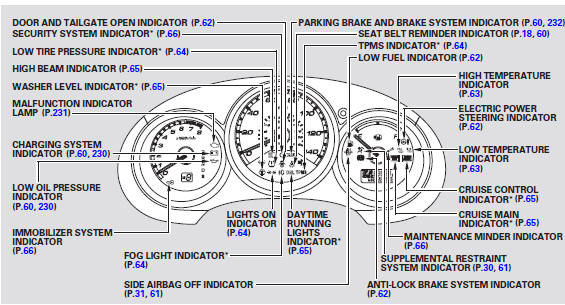
* : If equipped
See also:
Disc Player
...
iPod® Commands
iPod play
iPod play track # (#: 1 to 30)
iPod skip forward
iPod skip back
iPod track shuffle*
iPod album shuffle*
iPod track repeat*
iPod normal play (cancels repeat or
shuffle
* These comman ...
Temporarily Repairing a Flat Tire
Canadian models with automatic transmission
If the tire has a large cut or is otherwise severely damaged, you will need
to have the
vehicle towed. If the tire only has a small puncture, from a nai ...
Categories

© 2026 Copyright www.hfitinfo.com