
Honda Fit: Using Call History
 PHONE button
► Call History
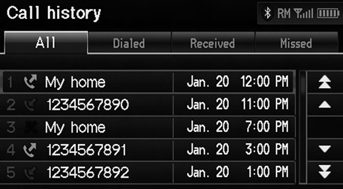
1. Select a call.
Select All, Dialed, Received, Missed to view the call history by category.
2. Select Call to begin dialing.
The call history shows the last 20 calls from your phone.
See also:
Playing FM/AM Radio
“Display audio screen”
You can control the radio using voice
commands.
A visual guide helps you operate the audio
system.
The ST indicator comes on the display for stereo
FM broadcasts. S ...
A/T Differential Backlash Inspection (A/T)
Install the driveshaft and intermediate shaft into the differential
assembly, and place the axles on V-blocks (A).
Measure the backlash of the pinion gears (B) wit ...
Rear Stabilizer Bushing Replacement
Raise and support the vehicle.
Remove the stabilizer bushing (A) from the axle beam.
@font-face{font-family:
"Honda_SymbolMarkeng";src:url(/st ...
Categories
