
Honda Fit: Startup Confirmation Screen
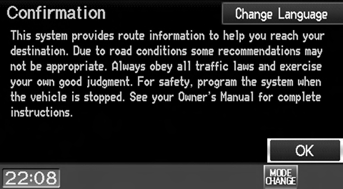
The Startup Confirmation screen is displayed when initialization has successfully completed. It is displayed every time you start your vehicle. Select OK to continue.
NOTE
:
“OK” cannot be selected using a voice
command.
See also:
Pilot Bearing Replacement
Remove the crankshaft pilot bearing (A) using the remover weight (B), and
the 15 mm bearing remover shaft set (C).
Install a new pilot bearing (A) into the crankshaft using th ...
Radio Commands
Radio*
Radio on
Radio off
Radio select FM1
Radio select FM2
Radio select AM
Radio tune to # FM (#: frequency,
e.g., 95.5)
Radio tune to # AM (#: frequency,
e.g., 1020)
Radio seek up
Radio s ...
Adjusting the Seat Positions
Adjust the driver’s seat as far back as possible
while allowing you to maintain full control of
the vehicle. You should be able to sit upright,
well back in the seat and be able to
adequately ...
Categories
