
Honda Fit: Visual Index
Second generation (2007-2026) / Honda Fit 2007-2026 Owners Manual / Quick Reference Guide / Visual Index
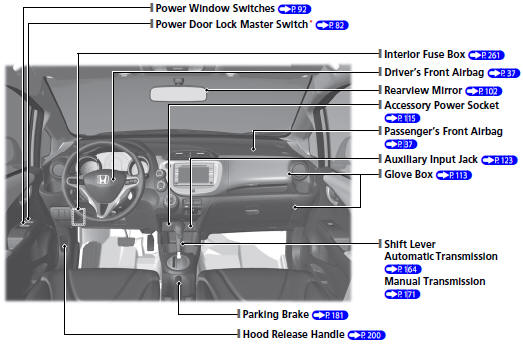
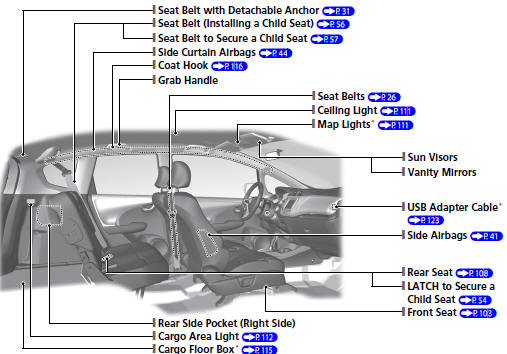
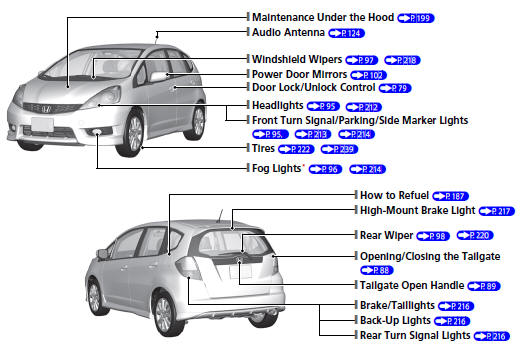
See also:
Transmission Side - Release Bearing Removal
Remove the transmission.
Remove the release fork boot (A) from the clutch housing (B).
Squeeze the release fork set spring (C) with pliers to remove the release
...
How to Refuel
1. Stop your vehicle with the service station
pump on the left side of the vehicle in the
rear.
2. Turn off the engine.
3. Press the area indicated by the arrow to
release the fuel fill door. Y ...
Route Commands
The system accepts these commands
when a route is set.
How long to the destination?
How far to the destination?
Display destination map
Display entire route ...
Categories

© 2026 Copyright www.hfitinfo.com