
Honda Fit: Guidance, Routing
Second generation (2007-2026) / Honda Fit 2007-2026 Navigation Online Reference Manual / Troubleshooting / Guidance, Routing
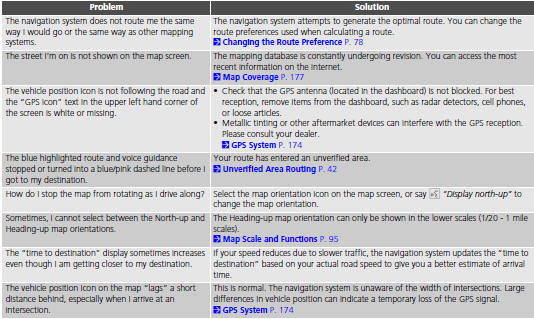
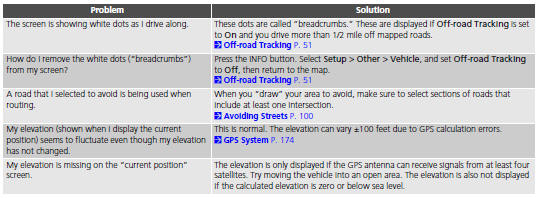
See also:
Playing a USB Flash Drive
Your audio system reads and plays sound files on a USB flash drive in either
MP3,
WMA or AAC*1 format.
Connect your USB flash drive to the USB adapter cable, then press the AUX
button.
*1:O ...
ATF Cooler Hose Replacement (A/T)
Drain the automatic transmission fluid (ATF).
Install the ATF cooler hoses over the ATF cooler lines, and secure the
hoses with the clips in the details (A), (B), (C), and (D) ...
PCV Valve Inspection
Remove the harness holder (A).
Check the PCV valve (A), the hoses (B), the pipe (C), and the connections
for leaks or restrictions.
At idle, make sure there is ...
Categories

© 2026 Copyright www.hfitinfo.com