
Honda Fit: Entering a Phone Number
 PHONE button
►Dial
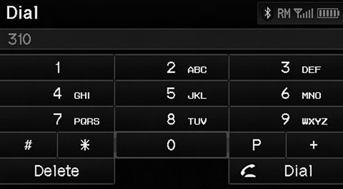
1. Enter a phone number.
2. Select Dial to begin dialing.
A command that consists of several numbers can be spoken together.
QRG
Index
Home
TOC
For example, say  “123-456-7890” at
once.
See also:
Important Safety Precautions
You’ll find many safety recommendations throughout this section, and throughout
this manual.
The recommendations on this page are the ones we consider to be the most important.
Always Wear Your ...
Rotor Slip Ring Test
Measure the resistance between the slip rings (A):
If the resistance is within the standard, go to step
22.
If the resistance is not within the standard, replace the roto ...
Secondary Shaft Disassembly, Inspection, and Reassembly (A/T)
Inspect the thrust needle bearings and the needle bearings for galling
and rough movement.
Inspect the splines for excessive wear and damage.
Check the shaft bearing s ...
Categories
