
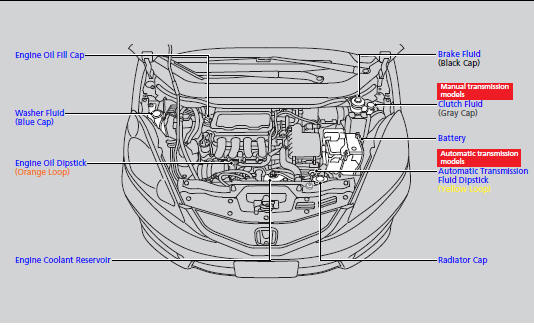
Honda Fit: Maintenance Items Under the Hood
Second generation (2007-2026) / Honda Fit 2007-2026 Owners Manual / Maintenance / Maintenance Under the Hood / Maintenance Items Under the Hood
See also:
Safety Labels
Label Locations
These labels are in the locations shown. They warn you of potential hazards
that can cause serious injury or death. Read these labels
carefully.
If a label comes off o ...
HVAC
...
Auxiliary Input Jack
U.S. Sport and all Canadian models
The auxiliary input jack is underneath the accessory power socket in the center
pocket. The system will accept auxiliary input from standard audio accessories.
...
Categories

© 2026 Copyright www.hfitinfo.com