
Seat Arona: Front camera
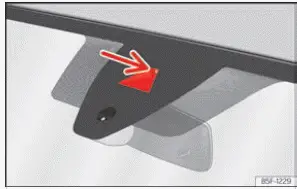
Fig. 94 On the windscreen: field of vision of the
Lane Assist system camera.
Depending on trim and equipment level, your Seat Arona may carry a front-facing camera mounted behind the upper section of the front windscreen.
Tracking road markings and lane boundaries ahead, this camera feeds visual data to the following driver assistance functions:
- Lane Assist
- Travel Assist
Automatic deactivation of supported functions
The front camera shuts off automatically whenever it detects that its view is continuously obstructed—for instance by packed snow, frost, or ice on the glass.
When the camera goes offline, the instrument cluster briefly displays the alert "Driver assist now limited. Front sensors without visibility" together with an acoustic chime.
Because the front sensor systems lack clear visibility, Lane Assist, Travel Assist, and Road Sign Recognition are all indicated as disabled while the obstruction persists.
NOTICE
Follow these routine checks so camera-based assistance on your Seat Arona works reliably:
- Wipe the camera's viewing area on the windscreen clean on a regular basis and clear away any snow or ice before setting off.
- Keep decals, sun strips, mounts, or anything else out of the camera's field of view.
- Inspect the windscreen glass in front of the camera for chips, cracks, or distortion that could impair image clarity.
Rear radar
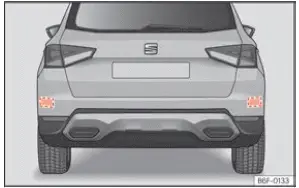
Fig. 95 Rear view of the vehicle: radar sensor
areas.
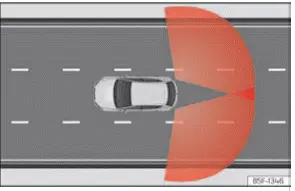
Fig. 96 Sensor detection zones.
Concealed behind the left and right sides of the rear bumper rather than exposed on the outside ››› Fig. 95, the rear radar sensors watch both side blind spots and approaching traffic behind the car ››› Fig. 96.
These rear sensors supply detection data for:
- Side Assist
- Rear Cross Traffic Alert
Automatic deactivation of supported functions
The rear radar sensors switch off automatically if one or both sensors register a persistent blockage in front of the bumper.
A buildup of snow or ice over a sensor area is a common trigger for this automatic shut-off.
An explanatory text message appears on the instrument cluster display to alert you.
Control lamps
 Side Assist function not
available
 Rear Cross Traffic Alert
function not available.
NOTICE
- Minor impacts or knocks—such as bumping into a curb or parking barrier—can shift or damage the rear bumper radar sensors, causing them to disconnect or operate with reduced accuracy.
- To keep rear radar detection dependable, clear snow and ice off the rear bumper and leave the sensor areas uncovered.
- Have the rear bumper refinished only with paint approved by SEAT, since non-approved coatings can interfere with radar signals and impair functions such as lane departure warning.
- Fallen leaves, snow, thick fog or mist, road grime, and other debris can limit radar visibility; clean the bumper surface ahead of the sensors whenever needed.
- Do not rely on auto lane changing or Rear Cross Traffic Alert when the rear radar sensors are soiled or covered.
- Rear-mounted accessories such as bicycle carriers or luggage racks can block the radar beam path and disrupt sensor operation.
See also:
Intermediate Shaft Reassembly (A/T)
Exploded View
Special Tools Required
Oil Seal Driver, 65 mm 07JAD-PL90100
Bearing Driver Attachment, 52 x 55 mm 07746-0010400
Bearing Driver Attachment, 35 mm I.D. 07746-0030400
Driver ...
Voice Control Operation
1 Press and release the (Talk)
button.
A helpful prompt asks what you
would like to do. Press and release
the (Talk) button again to bypass
this prompt.
► The icon is displayed and ...
Service Station Procedures
Refueling
1. Park with the driver’s side closest to the service station pump.
2. Outside of the vehicle, open the fuel fill door by pulling its notched edge.
3. Remove the fuel fill cap slowly. ...
Categories
