
Seat Arona: SEAT Digital Cockpit
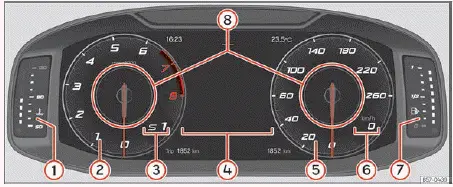
Fig. 2 SEAT Digital Cockpit on the instrument
panel (classic view).
- Engine coolant temperature display showing operating heat
- Revolution counter. Revolutions per minute the engine is running in the Seat Arona
- Gear engaged or position of the selector lever on the transmission
- Screen display for central readouts and status alerts
- Speedometer showing current road speed
- Digital speed display for quick numerical speed checks
- Fuel gauge indicating remaining fuel supply
- Information Profile area for customisable data readouts
The SEAT Digital Cockpit on the Seat Arona is a crisp digital instrument cluster built around a high-resolution colour TFT display.
It offers 3 distinct views you can cycle through using the button
 on the multifunction steering
wheel. By switching between information profiles, you can bring up details beyond the traditional round dials,
including turn-by-turn navigation, media playback, or trip statistics.
The 3 views are:
- Classic
- Dynamic
- Navigation
Every view presents core details on the display covering audio sources, phone activity, trip figures, vehicle status, navigation prompts, and active driving aids in your Seat Arona.
Across all views, the content inside the Information profiles can be tailored to your preferences ››› Fig. 2 8.
Information profiles
Open the infotainment system menu  > Selection
> Digital Cockpit to switch between the
available layouts and readouts shown in the
SEAT Digital Cockpit.
Classic View
The revolution counter and speedometer scales span across the full layout ››› Fig. 2.
View 1, 2, 3 or AUTOMATIC
Customise the specific data shown inside the SEAT Digital Cockpit for everyday driving. Up to 2 of these items can appear side by side at once, and you pick which ones show up—and in what order—by sliding your finger vertically across the gauge area.
Depending on the vehicle version, your chosen Views can be saved either by leaving the menu or by holding down the View button.
- Consumption. Graphic bar showing real-time consumption along with a digital readout of average fuel usage.
- Audio. Clear digital readout of the track or station currently playing.
- Altitude. Digital figure showing current elevation above sea level.
- Compass. Digital heading indicator for direction of travel.
- Destination arrival information. Digital summary of remaining travel time, distance to your destination, and estimated arrival time.
- Range. Digital estimate of how far you can drive on remaining fuel.
- Travelling time. Elapsed time recorded for the current trip.
- Route guidance. Active turn and route instructions along your planned path.
- Journey. Digital readout of total distance covered on the trip.
- Assist systems. Graphic overview showing active driver assistance functions.
- Road signs. Readout of speed limits and traffic signs picked up by the car.
- Navigation. Visual route display featuring directional arrows.
Exact options depend on your car's equipment, as well as the number and layout of selectable information profiles.
See also:
Cylinder Head Cover Removal
Remove the intake manifold chamber.
Disconnect the four ignition coil connectors (A).
Remove the harness holder (B) and the breather hose (C).
Remove ...
Childproof Door Locks
The childproof door locks prevent the rear doors from being opened from the
inside
regardless of the position of the lock tab.
To open the door from the inside when the
childproof door lock is on ...
Torque Converter Housing Countershaft Bearing Replacement (A/T)
Special Tools Required
Adjustable Bearing Puller, 25пјЌ40 mm 07736-A01000B
Driver Handle, 15 x 135L 07749-0010000
Oil Seal Driver Attachment, 58 mm 07JAD-PH80101
Remove the countersh ...
Categories
