
Honda Fit: MTF Inspection and Replacement (M/T)
-
Park the vehicle on level ground, and turn the engine off.
-
Raise the vehicle on a lift, and make sure it is securely supported.
-
Remove the splash shield.
-
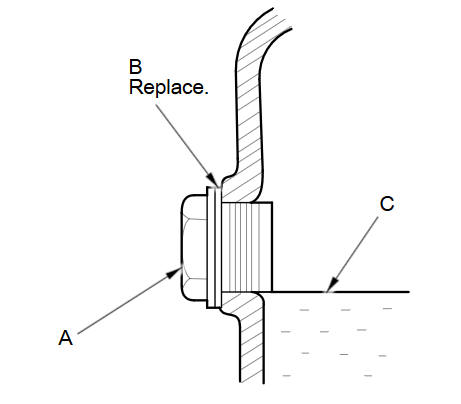
Remove the filler plug (A) and the sealing washer (B), check the condition of the MTF, and make sure it is at the proper level (C).
-
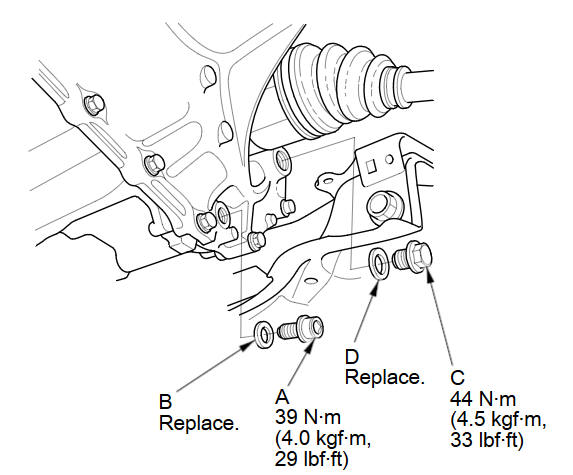
If the MTF is dirty, remove the drain plug (A) and the sealing washer (B), and drain the MTF.
-
Reinstall the drain plug with a new sealing washer, and refill the transmission with MTF to the proper level. Always use Honda Manual Transmission Fluid (MTF).
Fluid Capacity:
1.5 L (1.6 US qt) at fluid change
1.6 L (1.7 US qt)at overhaul
-
Install the filler plug (C) with a new sealing washer (D).
-
Install the splash shield.
-
Lower the vehicle on the lift.
-
Connect the Honda diagnostic system (HDS) to the data link connector (DLC).
-
Turn the ignition switch to ON (II).
-
Make sure the HDS communicates with the vehicle and the engine control module (ECM). If it doesn't, communicate, troubleshoot the DLC circuit.
-
Select GAUGES in the BODY ELECTRICAL with the HDS.
-
Select ADJUSTMENT in the GAUGES with the HDS.
-
Select MAINTENANCE MINDER in the ADJUSTMENT with the HDS.
-
Select RESET in the MAINTENANCE MINDER with the HDS.
-
Select MAINTENANCE SUB ITEM 3 RESET,and reset the MTF with the HDS.
See also:
Fuel and Emissions System Description - Electronic Throttle Control System
Electronic Throttle Control System
The throttle is electronically controlled by the electronic throttle
control system (ETCS). Refer to the system diagram to see a functional
layout of the ...
Instruments and Controls
This section gives information about the controls and displays that contribute
to the daily operation of your vehicle. All the essential controls are within easy
reach. ...
Using Speed Dial
PHONE button
► Speed Dial 1 or Speed Dial 2
1. Select a speed dial entry.
2. Select Call to begin dialing.
To make a call using speed dial, you need to
create speed dial entries.
More S ...
Categories
