
Honda Fit: Compatible iPod® and USB Flash Drives
iPod® Model Compatibility
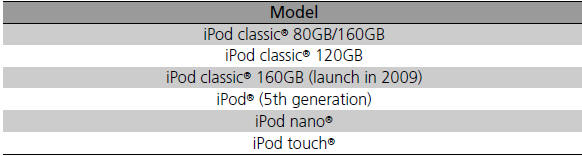
This system may not work with all software versions of these devices.
USB Flash Drives
• Use a recommended USB flash drive of 256 MB or higher.
• Some digital audio players may not be compatible.
• Some USB flash drives (e.g., a device with security lockout) may not work.
• Some software files may not allow for audio play or text data display.
• Some versions of MP3, WMA, or AAC formats may be unsupported.
Files on the USB flash drive are played in their stored order. This order may be different from the order displayed on your PC or device.
See also:
Interior Rearview Mirror
Adjust the angle of the rearview mirror when you are sitting in the correct
driving
position.
■Rearview Mirror with Day and Night Positions
Flip the tab to switch the position.
The nig ...
Map Matching
Map matching is the process of using the
acquired GPS information to locate your
position on the map screen. If you are on a
mapped road, the name of the road is
displayed along the bottom of the ...
Heating and Cooling System Maintenance
Dust and Pollen Filter
The heating and cooling system is equipped with a dust and pollen filter that
collects
pollen, dust, and other debris in the air. The Maintenance Minder message will
let
...
Categories
