
Honda Fit: Fuel Line/Quick-Connect Fitting Precautions
The fuel line/quick-connect fittings (A, B, C, D, E, F, G, H, I, J, K and L) connect the fuel rail (M) to fuel feed hose (N), the fuel feed hose to the fuel line (O), the fuel feed line (P) to the fuel tank unit (Q), the fuel tank unit to the fuel vent tube (R), the fuel tank unit to the suction line (S), the fuel vent tube to the fuel tank vapor control valve hose (T), the suction tube to the fuel tank vapor recirculation tube (U), the suction tube to the breather pipe (V), the breather pipe to the non-return valve tube (W), and the fuel purge pipe (X) to the EVAP canister (Y). When removing or installing the fuel feed hose, the fuel tank unit, the fuel tank, or the suction tube, or when disconnecting/connecting the quick-connect fittings, pay attention to the following:
-
The fuel feed hose, the fuel line and the quick-connect fittings are not heat-resistant; be careful not to damage them during welding or other heat-generating procedures.
-
The fuel feed hose, the fuel line and the quick-connect fittings are not acid-proof; do not touch them with a shop towel which was used for wiping battery electrolyte. Replace them if they came into contact with electrolyte or something similar.
-
When connecting or disconnecting the fuel feed hose, the fuel line and the quick-connect fittings, be careful not to bend or twist them excessively. Replace them if they are damaged.
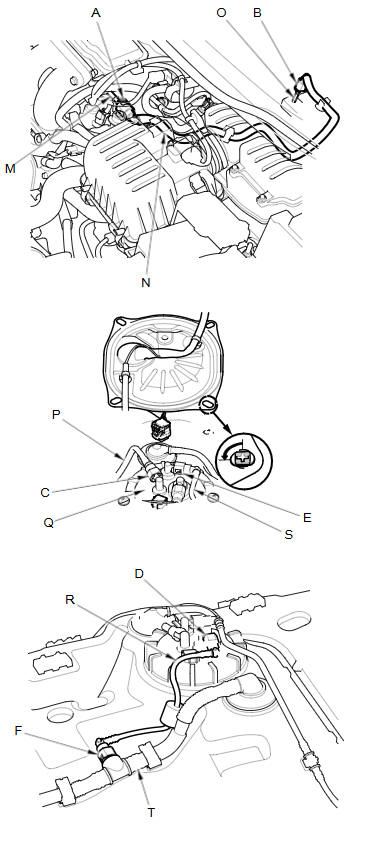
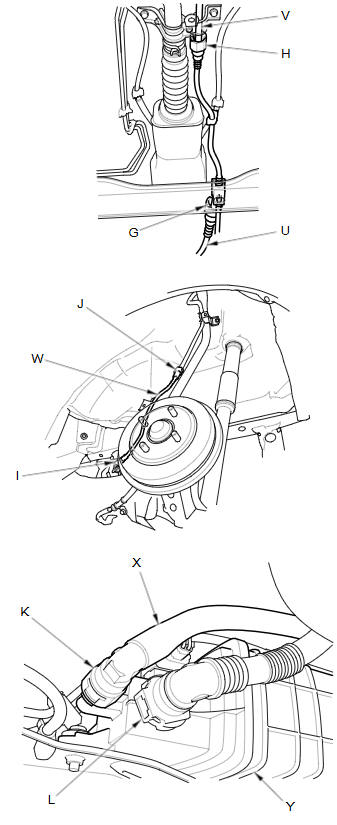
A disconnected quick-connect fitting can be reconnected, but the retainer on the mating line cannot be reused once it has been removed from the line. Replace the retainer when:
-
replacing the fuel rail.
-
replacing the fuel feed line.
-
replacing the fuel pump.
-
replacing the fuel filter.
-
replacing the fuel gauge sending unit.
-
replacing the EVAP purge line.
-
replacing the EVAP canister.
-
replacing the fuel fill pipe.
-
replacing the fuel tank.
-
replacing the suction tube.
-
it has been removed from the line.
-
it is damaged.
NOTE:
-
When you replace a retainer, use the same size and manufacturer as the original retainer.
-
The fuel line/quick-connect fittings retainer (L) can be reused once.
|
Location |
Manufacturer |
Retainer Color |
Line Diameter |
|
A |
Tokai DTR |
Blue green |
0.3 in (8.0 mm) |
|
B |
Tokai DTR |
Green |
0.25 in (6.3 mm) |
|
C |
Sanoh |
White |
0.4 in (9.5 mm) |
|
D |
Tokai |
Blue green |
0.3 in (8.0 mm) |
|
E |
Tokai |
Blue green |
0.3 in (8.0 mm) |
|
F |
Tokai |
Blue green |
0.3 in (8.0 mm) |
|
G |
Tokai DTR |
Natural |
0.5 in (12 mm) |
|
H |
Tokai DTR |
Natural |
0.5 in (12 mm) |
|
I |
Tokai DTR |
Natural |
0.5 in (12 mm) |
|
J |
Tokai DTR |
Natural |
0.5 in (12 mm) |
|
K |
Sanoh |
White |
0.5 in (12 mm) |
|
L |
Tokai DTR |
Green |
0.7 in (19 mm) |
See also:
Basic Settings
INFO button
► Setup ►Other
►Basic Settings
Set the map units to either miles or kilometers, and control the voice
feedback from
the navigation system.
Select an item.
The ...
Grab Handle Removal/Installation
Special Tools Required
KTC Trim Tool Set SOJATP2014
*Available through the Acura Tool and Equipment Program; call
888-424-6857
NOTE: Use the appropriate tool from the KTC trim tool set ...
Fuel and Emissions System Description - PGM-FI System
PGM-FI System
The programmed fuel injection (PGM-FI) system is a sequential multiport
fuel injection system.
Alternator Control
The alternator signals the ECM/PCM during chargi ...
Categories
