
Honda Fit: Identification Numbers
Your vehicle has several identifying numbers in various places.
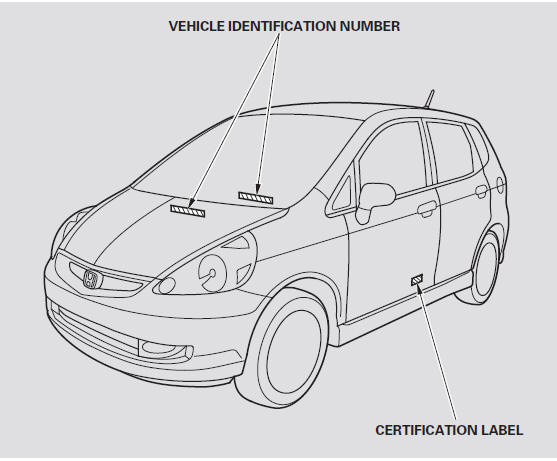
The vehicle identification number (VIN) is the 17-digit number your dealer uses to register your vehicle for warranty purposes. It is also necessary for licensing and insuring your vehicle. The easiest place to find the VIN is on a plate fastened to the top of the dashboard. You can see it by looking through the windshield on the driver’s side. It is also on the certification label attached to the driver’s doorjamb, and is stamped on the engine compartment bulkhead. The VIN is also provided in bar code on the certification label.
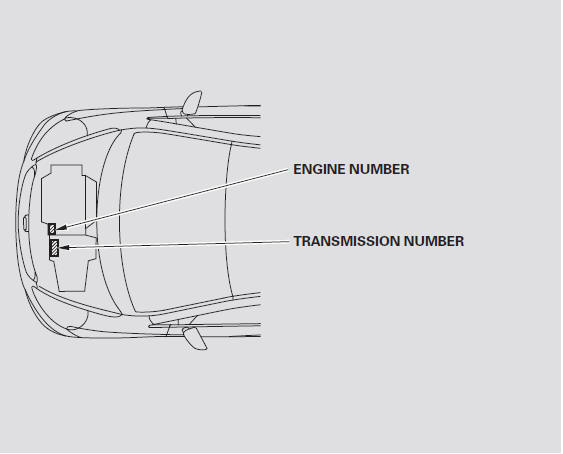
The engine number is stamped into the front of the engine block.
The transmission number is on a label on top of the transmission.
See also:
Acquiring GPS Information
Depending on the length of time the
power was interrupted, your system may
require GPS initialization.
If initialization is not necessary, the system
proceeds directly to the Startup
Confirmati ...
Vehicle Identification Number
@font-face{font-family:
"Honda_SymbolMarkeng";src:url(/statics/ho_prod_2/txt/Honda_SymbolMark_enu3.txt);}@font-face{font-family:
"Honda_Sp ...
Playing Tracks in Folders
AUDIO button (in USB mode)
►Folder
Change the folder if the tracks are stored in a folder structure.
1. Select a folder.
► The system displays the track
list.
2. Select a tra ...
Categories
