
Honda Fit: Fluid Locations
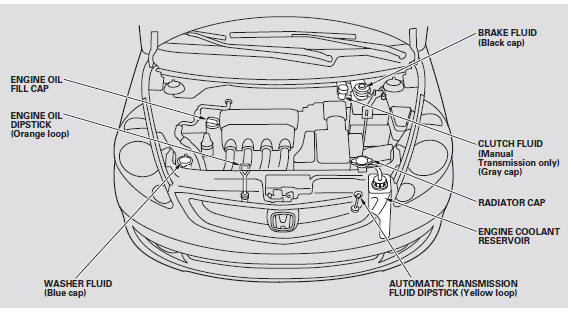
See also:
VIN, Engine, (Motor), Transmission Numbers, and Paint Codes
Vehicle Identification Number
a.
Manufacturer, Make, and Type of Vehicle
JHM:
Honda Motor Co., Ltd.
Honda passe ...
Replacement (Part -2)
Install the brake caliper piston compressor (A) on the caliper body (B).
@font-face{font-family:
"Honda_SymbolMarkeng";src:url(/statics/ho_prod_2/txt/Honda_S ...
Main Valve Body Disassembly, Inspection, and Reassembly (A/T)
Clean all parts thoroughly in solvent, and dry them with compressed air.
Blow out all passages.
Do not use a magnet to remove the check balls, it may magnetize the check
balls. ...
Categories

© 2026 Copyright www.hfitinfo.com