
Honda Fit: Your Vehicle at a Glance
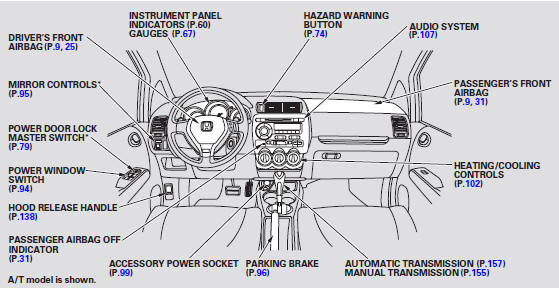
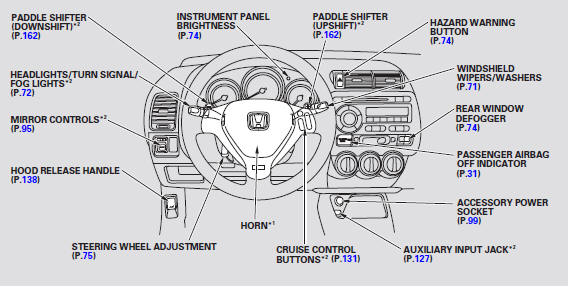
* 1: To use the horn, press the center pad of the steering wheel.
* 2: If equipped.
See also:
Rear bumper:
@font-face{font-family:
"Honda_SymbolMarkeng";src:url(/statics/ho_prod_2/txt/Honda_SymbolMark_enu3.txt);}@font-face{font-family:
"H ...
Steering Rack Guide Adjustment
Special Tools Required
Locknut Wrench, 40 mm 07MAA-SL00100, 07916-SA50001, or 07AAA-TL2A100
Set the wheels in the straight ahead position.
Loosen the rack guide screw locknut ...
Interior Convenience Items
Beverage Holders
Be careful when you are using the beverage holders. A spilled liquid that is
very hot can scald you or your passengers. Liquid can also spill from the door pocket
beverage ho ...
Categories
