
Honda Fit: Map, Voice, Entering Destinations
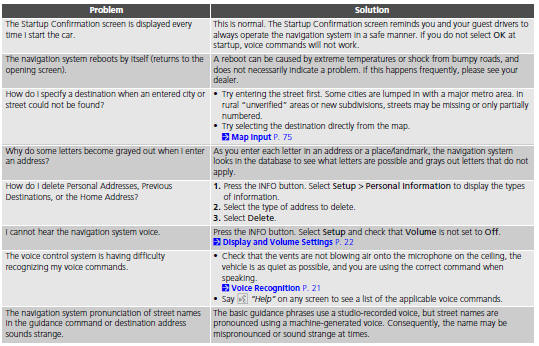
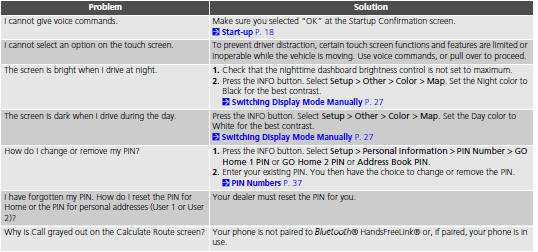
Second generation (2007-2026) / Honda Fit 2007-2026 Navigation Online Reference Manual / Troubleshooting / Map, Voice, Entering Destinations
See also:
Acquiring GPS Information
Depending on the length of time the
power was interrupted, your system may
require GPS initialization.
If initialization is not necessary, the system
proceeds directly to the Startup
Confirmati ...
Shift Solenoid Valve Removal and Installation (A/T)
NOTE: Do not hold the solenoid valve connector to remove and install the
solenoid valve. Be sure to hold the solenoid valve body.
Remove the mounting bolts, then remove the solenoid valves by ...
Dashboard Center Lower Trim Removal/Installation
Special Tools Required
KTC Trim Tool Set SOJATP2014
*Available through the Honda Tool and Equipment Program; call
888-424-6857
NOTE:
Take care not to scratch the dashboard or its ...
Categories

© 2026 Copyright www.hfitinfo.com