
Honda Fit: Calculating the Route on the Destination Map
Calculate the route from the map of the destination address.
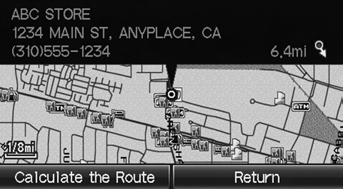
Select Calculate the Route.
► The system calculates and displays the route line on the map screen.
 “Display Destination Map” (when
en route)
See also:
Clock Adjustment
INFO button
► Setup ►Other
►Clock Adjustment►Clock Adjustment
Set the automatic adjustment of the system clock for daylight saving and
international time zones.
Select ...
Obtaining Navigation Update Data
Honda is continually expanding the scope
of the navigation system. Navigation
system software upgrades may be made
available periodically, usually in the fall of
each year.
To purchase an updat ...
Installation
Install the alternator (A), then tighten the alternator mounting bolts (B).
@font-face{font-family:
"Honda_SymbolMarkeng";src:url(/statics/ho_prod_2/txt/Hond ...
Categories
