
Honda Fit: Changing the Route Preference
Change the route preference by selecting minimum or maximum driving methods.
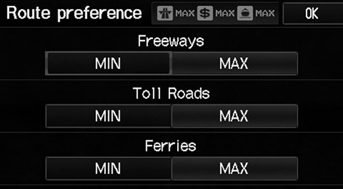
1. Select MIN or MAX for each item.
2. Select OK.
The calculated route may not be the route you would choose. For safety reasons, the system generally applies the following rules to your route:
• Shortcuts through residential areas are avoided.
• Right turns are favored over left turns or Uturns.
• Time-restricted turns (turns prohibited at certain times of the day) are not used.
See also:
Introduction
Congratulations! Your selection of a 2008 Honda Fit was a wise investment.
It will give you years of driving pleasure.
One of the best ways to enhance the enjoyment of your new vehicle is to read
...
Seat Belt Inspection
Out of Vehicle
For front seat belt retractors with seat belt tensioners,
review the SRS component locations and
the precautions and procedures before doing
repairs or serv ...
Selecting USB Mode
1. Connect the USB flash drive to the
USB adapter cable in the center
console.
2. Press the CD/AUX button until you
get to USB mode.
3. Select AUDIO/STREET until
AUDIO is highlighted in blue ...
Categories
