
Seat Arona: Navigation
Introduction
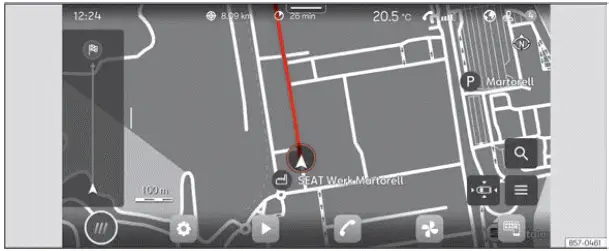
Fig. 139 Schematic representation: Navigation
view.
In your Seat Arona, a global satellite system tracks the car's current position while onboard vehicle sensors monitor movement and travel paths.
Measured vehicle telemetry and reported traffic incidents are cross-checked against stored map data to calculate practical routes toward your destination.
Spoken route prompts and on-screen graphics guide you step by step to where you are going.
You control navigation directly on the infotainment display.
In certain countries, selected display functions lock or become unavailable above a set driving speed—an intentional measure tied to local traffic laws rather than a fault in the system.
Navigation announcements
Navigation announcements are voice guidance cues that tell you how to follow your active route while driving the Seat Arona.
How often voice prompts play and what they say adapt to your settings and road situation, such as starting a route, cruising on a motorway, or approaching a roundabout.
When a destination cannot be pinpointed precisely—for instance in an area that has not been digitized—the screen shows address details along with the remaining distance to your target.
During active dynamic guidance, the system alerts you to traffic jams reported along your path and plays an extra voice announcement whenever it reroutes you around congestion.
Adjusting the voice prompt volume while a navigation announcement is speaking updates that volume level for upcoming announcements as well.
Limitations during navigation
When satellite signals drop out—such as inside a tunnel or underground car park—the Seat Arona continues estimating position and guiding you using its onboard vehicle sensors.
Where map coverage is missing or only partly digitized in system memory, navigation still tries to calculate route guidance as far as available data allows.
Gaps or incomplete details in the map database can make exact vehicle positioning harder, reducing normal route accuracy.
Road networks change continuously through new roads, construction zones, street closures, renamed streets, and renumbered buildings, so outdated map data can cause routing mistakes or inaccuracies.
Managing the navigation map
You can also steer and inspect the navigation map using multi-touch finger gestures on the display.
Moving the map
Tip: use your index finger
- Drag across the screen with your finger to pan the map.
Zooming into or out of the view
Tip: use your index finger
- Tap twice on the map and keep your finger pressed against the screen.
- Slide your finger upward to zoom out for a wider map view, or slide downward to zoom in for closer detail.
Change the 2D / 3D view
Tip: use your index and middle fingers
- Touch the map with both fingers together and hold them on the glass.
- Drag both fingers downward to switch to 2D view, or drag them upward to switch to 3D view.
Rotate the map
Tip: use your thumb and index finger
- Place both fingers on the map at the same time and keep holding them in place.
- Twist your fingers clockwise or counter-clockwise to rotate the map orientation.
Saved data
To speed up destination entry and refine route suggestions in your Seat Arona, the system stores certain history items such as frequent destinations and past position data.
Delete saved data
- Tap Settings > Basic function settings > Delete, then confirm with Accept.
WARNING
Change navigation settings, type in destinations, or edit routes only while the vehicle is stopped.
Note
- Taking an alternate turn or detour during active guidance can prompt the system to recalculate your route.
- How accurate and helpful route guidance feels depends on the currency of your map data and live traffic congestion reports.
- Spoken navigation prompts stay silent whenever audio output is muted on the infotainment system.
See also:
Protecting Child Passengers
Each year, many children are injured or killed in vehicle crashes because
they are
either unrestrained or not properly restrained. In fact, vehicle accidents are
the
number one cause of death of ...
Off-road Tracking
INFO button
► Setup ►Other
►Vehicle
The navigation system can be set to display white off-road tracking dots
(“breadcrumbs”) on the map screen whenever you drive into an are ...
Key Types and Functions
This vehicle comes with the following keys:
All of the keys have an immobilizer system. The
immobilizer system helps to protect against vehicle
theft.
The keys contain precision electronics.
Ad ...
Categories
