
Seat Arona: Introduction
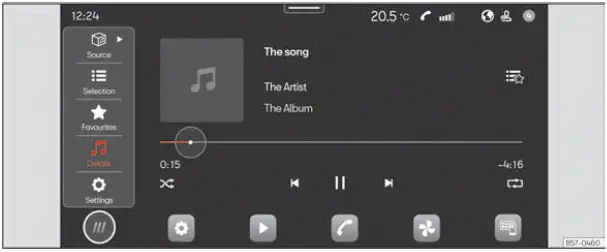
Fig. 138 Schematic representation: Media view
Media mode in your Seat Arona lets you play multimedia files stored on external media through the infotainment system.
Depending on vehicle specification, you can play content from these sources:
- USB storage media—such as a USB flash drive or a mobile phone linked over USB.
- Bluetooth devices, including a mobile phone or tablet.
Depending on system equipment, supported media types include:
- Audio files.
- Video files (where supported by your infotainment unit).
Access the MEDIA menu
- Tap HOME >
 ››› Fig. 138.
Access the settings
- Tap HOME >
 >
 .
Data media limitations and indications
USB drives or other storage media may fail to operate if exposed to high cabin heat or physical damage.
Always follow the care and operating guidelines from the storage medium's manufacturer.
Differences in build quality across storage media from different makers can trigger playback glitches or errors.
Improper formatting or drive configuration can leave a storage medium unreadable by the system.
Playlists only define playback order and point to where media files sit inside the folder tree—they do not store the actual audio or video files themselves, so the referenced files must exist in those folders on the medium to play.
Note
SEAT accepts no liability for damaged or lost files on external storage devices.
See also:
Hood Opener Cable Replacement
NOTE:
Put on gloves to protect your hands.
Take care not to scratch the body or its related parts.
Remove these items:
Front grille cover
Front ...
Canceling the Route
DEST button (when en route)
►Cancel Route
Cancel the route guidance and remove the destination and all waypoints from
the
destination list. The system then returns to the map screen.
You ...
Correct Vehicle Position
INFO button
► Setup ►Other
►Vehicle
Manually adjust the current position of the vehicle as displayed on the map
screen if
the position appears to be incorrect.
1. Put the v ...
Categories
