
Seat Arona: Shown on the display
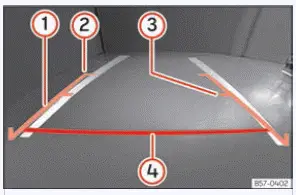
Fig. 129 Infotainment system display:
guidance lines.
- Lateral guide lines: projected extension of your Seat Arona—roughly matching its overall width—across the road surface behind you.
- End of the side lines: marks approximately 2 m behind the rear of the vehicle on the ground.
- Intermediate line: marks approximately 1 m behind the vehicle on the road surface.
- Horizontal red line: indicates a safe clearance margin of roughly 40 cm behind the vehicle on the road.
Switching the system on and off
- Reverse Assist turns on through a switch contact as soon as you engage reverse gear.
- The system shuts off roughly 8 seconds after you shift out of reverse, and immediately when you switch off the ignition.
- Camera video stops above roughly 15 km/h (9 mph) even while reverse gear remains selected.
When paired with Park Assist Plus on your Seat Arona, the rear camera view disappears as soon as you leave reverse gear and switches back to the optical display from the parking system.
You can also conceal the camera image manually on the screen:
- Tap one of the infotainment buttons shown on the display.
- Or tap the miniature car icon displayed on the screen.
To bring the Reverse Assist image back onto the screen:
- Shift out of reverse and engage reverse gear again.
- Or press the RVC function button.
Parking manoeuvre
- Bring the car to a stop ahead of the parking spot and select reverse gear.
- Back up slowly while steering so the projected side lines angle toward the parking bay.
- Steer your Seat Arona into the space so the side lines run parallel to the spot's sides.
See also:
Reporting Errors
You can help to improve database
accuracy by reporting any errors you
encounter.
• Report errors in freeways and main
“verified” roads shown in black on the
map at http://mapreporter.navteq ...
Changing the Rear Wiper Blade Rubber
1. Raise the wiper arm off.
2. Pivot up the bottom end of the wiper blade
until it comes off from the wiper arm.
3. Slide the wiper blade out from the end with
the indent.
NOTICE
Avoid dro ...
Introduction
Adaptive Cruise Control (ACC) on your Seat Arona holds a steady cruising speed chosen by the driver, and when you
close in on traffic ahead, it senses the vehicle in front and adjusts speed automati ...
Categories
