
Honda Fit: How to Refuel
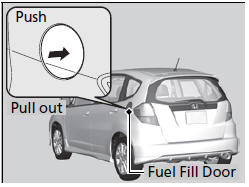
1. Stop your vehicle with the service station pump on the left side of the vehicle in the rear.
2. Turn off the engine.
3. Press the area indicated by the arrow to release the fuel fill door. You will hear a click.
WARNING
Gasoline is highly flammable and explosive.
You can be burned or seriously injured when handling fuel.
• Stop the engine, and keep heat, sparks, and flame away.
• Handle fuel only outdoors.
• Wipe up spills immediately.
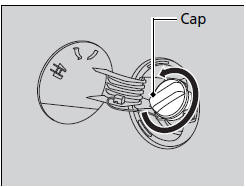
4. Remove the fuel fill cap slowly. If you hear a release of air, wait until this stops, then turn the knob slowly to open the fuel fill cap.
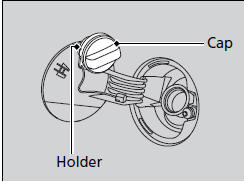
5. Place the fuel fill cap in the holder.
6. Insert the filler nozzle fully.
► When the tank is full, the fuel nozzle will click off automatically. This leaves space in the fuel tank in case the fuel expands with a change in the temperature.
7. After filling, replace the fuel fill cap, tightening it until you hear it click at least once.
► Shut the fuel fill door by hand.
The filler nozzle automatically stops to leave space in the fuel tank so that fuel does not overflow as a result of changes in air temperature.
If the filler nozzle keeps turning off when the tank is not full, there may be a problem with the pump’s fuel vapor recovery system. Try filling at another pump. If this does not fix the problem, consult a dealer.
Do not continue to add fuel after the nozzle has automatically stopped. Additional fuel can exceed the full tank capacity.
See also:
Shift Cable Adjustment (A/T)
Remove the center console.
Shift the transmission to N.
Remove the nut securing the shift cable end.
Rotate the socket holder (A) on the shift cable ( ...
Removal
NOTE: Do not allow dust, dirt, or other foreign materials to enter the
steering gearbox.
Remove the steering gearbox.
Remove both tie-rod ends from the rack ends.
R ...
Interior Convenience Items
Beverage Holders
Be careful when you are using the beverage holders. A spilled liquid that is
very hot can scald you or your passengers. Liquid can also spill from the door pocket
beverage ho ...
Categories
