
Seat Arona: Description
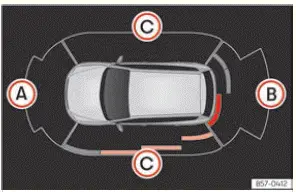
Fig. 118 Park assist view on the Infotainment
system display.
Park assist plus on your Seat Arona supports low-speed manoeuvring by giving visual cues on screen and audible warnings when an obstacle is detected ahead of or behind the vehicle.
Sensors built into the front and rear bumpers pick up nearby objects and report them through acoustic tones and the infotainment screen ››› Fig. 118.
As you close in on an object, the pitch or frequency of the warning tones helps you tell whether the obstacle lies in front of the car or behind it.
Approximate sensor measurement ranges are:
- 1.20 m
- 1.60 m
- 0.90 m
Moving closer to an obstacle speeds up the beeping interval until the tone becomes continuous around 0.30 m—time to bring the car to a stop! If you hold the same distance, the alert volume steps down after roughly 4 seconds.
To build a full picture around the car, drive forward or backward a few metres so previously unmapped zones are screened and side obstacles in area C appear on the display ››› Fig. 118.
Special features of ParkPilot with Area View
The screened side-view zone on the display hides automatically in these situations:
- Any door on the vehicle is opened.
- Traction Control (TCS) has been turned off.
- TCS or Electronic Stability Control (ESC) is actively regulating.
- Your Seat Arona stays stationary for longer than roughly 3 minutes.
Error messages
A fault or error message shown on the instrument cluster during Park Assist operation points to a system fault.
If the fault clears or is not present before you switch off the ignition, it will not show up the next time you connect Park Assist.
When a rear sensor has a fault, only obstacles ahead are shown; if a front sensor is faulty, only obstacles behind the vehicle are displayed, along with the warning symbol.
Have a specialist workshop diagnose and repair any fault on your Seat Arona.
Trailer mode
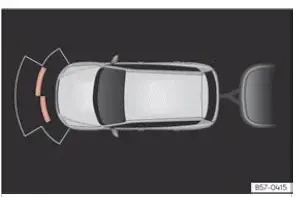
Fig. 119 Park assist display on the screen with
trailer attached.
On a Seat Arona with a factory-fitted tow hitch, connecting a trailer electrically stops the rear sensors from
activating when you select reverse or press the  button, so objects behind or to the sides are neither shown on
screen nor signaled by chimes.
Only front sensor detections remain visible on the screen, while the predicted vehicle path line is hidden.
Park assist settings
You can customize Park Assist alerts and audio behavior in the infotainment menu:
- Automatic activation: On/off
- Front volume: Volume level for the front and rear zones.
- Rear volume: Volume level for the rear zone.
- Reduce volume: Lowers entertainment audio volume automatically when Park Assist turns on, depending on what you select.
- Front sound settings/treble: Tone adjustment for front alerts.
- Rear sound settings/treble: Tone adjustment for rear alerts.
WARNING
- Look directly at the road and surroundings around your Seat Arona at all times; parking assist systems never replace driver attention, and full responsibility stays with you as the driver.
- Sensors have blind zones where people or obstacles go undetected—take special care around children and pets.
- Keep a direct eye on your surroundings and check the exterior and interior mirrors for added visibility.
NOTICE
Park assist plus operation on your Seat Arona can be influenced by several factors that risk causing damage if not accounted for:
- In certain conditions, the system fails to sense or show specific items:
- Chains, trailer drawbars, railings, fences, bollards, and slender trees.
- Items positioned higher than the sensors, such as overhanging ledges or wall projections.
- Surfaces or textures with particular properties, including wire-mesh fencing or powdery snow.
- Some object materials and types of clothing fail to bounce ultrasonic waves back properly.
As a result, the system cannot reliably register those objects or pedestrians wearing such fabrics.
- Outside acoustic sources can interfere with sensor signals and keep them from picking up nearby people or obstacles.
- When warned about a low object nearby, bear in mind that once registered, a low obstacle can drop out of sensor range as you pull closer, stopping further proximity alerts; under certain conditions, features like tall kerbs that can scrape the underbody go undetected.
- Ignoring distance warnings from the parking system can result in substantial damage to your Seat Arona.
- Impacts or damage to the radiator grille, bumper, wheel arch, or underbody can shift sensor alignment
and disrupt park assist performance.
Have a specialist workshop inspect the system if damage occurs.
- A licence plate or frame that extends beyond the dedicated plate recess, or a plate that is bent or warped, can trigger false readings or block sensor visibility.
Note
- The infotainment screen responds with a minor lag.
- Under certain circumstances, alerts can sound even when no obstacle sits inside the monitored zone:
- Uneven paving, cobbles, or tall grass.
- Outside ultrasonic sources, including nearby cars using ultrasonic parking sensors.
- Heavy rain, snow, hail, or thick exhaust plumes.
- A licence plate mounted loosely against the bumper surface.
- Shifts in road slope or gradient.
- To keep operation dependable, wipe sensors clean of dirt, snow, and ice, and never place stickers or covers over them.
- When cleaning with a pressure washer or steam cleaner, avoid direct spraying—or keep any pass brief and stay more than 10 cm away from the sensors.
- Adding front-end accessories—such as a promotional licence plate surround—can disrupt how Park Assist works on your Seat Arona.
- Practising parking manoeuvres in a quiet, traffic-free area is recommended before relying on them in busy spots.
- You can adjust the volume and pitch of warning tones and visual cues.
- Follow the guidance provided for towing a trailer.
Note
On models without an infotainment system, these settings can be adjusted at an official SEAT service partner or a specialist workshop.
See also:
Fog Light Bulbs
When replacing, use the following bulbs.
Fog Light: 55 W (H11)
1. Pry on the edge of the cover using a flat-tip
screwdriver to remove the cover.
► Wrap the flat-tip screwdriver with a cl ...
Emergency Towing
Call a professional towing service if you need to tow your vehicle.
■ Flat bed equipment
The operator loads your vehicle on the back of a truck.
This is the best way to transport your veh ...
Brake Light, Taillight, Back-Up Light and Rear Turn
Signal Light Bulbs
When replacing, use the following bulbs.
Brake/Taillight: 21/5 W
Back-Up Light: 16 W
Rear Turn Signal Light: 21 W (Amber)
1. Pry on the edge of the cover using a flat-tip
screwdriver to remove ...
Categories
