
Seat Arona: Introduction
Travel Assist on your Seat Arona pairs Adaptive Cruise Control (ACC) with adaptive lane guidance for coordinated speed and lane support.
Within its technical limits, the car can hold a preselected following gap behind the vehicle ahead while keeping your chosen position inside the lane.
Because Travel Assist relies on the same sensors as Adaptive Cruise Control (ACC) and Lane Assist, it shares their operating characteristics.
Be sure to read the sections covering ACC and Lane Assist carefully and keep their limitations and instructions in mind.
How to know if the vehicle is fitted with Travel Assist
Your Seat Arona includes Travel Assist when the multifunction steering wheel carries the  button.
Speed range
Depending on vehicle specification, Travel Assist regulates speed starting from 0 km/h (0 mph), while the target speed can be set from 30 km/h (20 mph) upward.
Driving with Travel Assist
Travel Assist manages the accelerator pedal, brakes, and steering automatically; within system limits, it can also bring the car to a stop behind a halting vehicle ahead and pull away again automatically.
You can step in and override assisted steering, braking, or acceleration at any time.
Status display
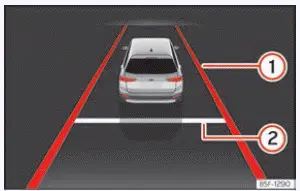
Fig. 112 On the instrument cluster display:
display of active regulation (schematic
representation).
- Lane marking color shows the current state of adaptive lane guidance.
- Yellow: adaptive lane guidance is actively steering.
- Grey: adaptive lane guidance is in passive standby.
- Set following distance level.
Depending on equipment level, extra visual cues—such as dashed lane lines and nearby vehicles ahead—can also appear on the instrument cluster screen.
Indicator lamps on the instrument cluster display show how Travel Assist is operating:
 Indicator lamp green: Travel
Assist active,
adaptive cruise control and adaptive
lane guidance function are active.
 Partially
green lamp: Travel
Assist active,
adaptive cruise control active and
adaptive lane guidance function passive.
 Grey lamp: Travel Assist
deactivated,
not regulating.
WARNING
Travel Assist technology cannot overcome physical limits or the laws of physics and works strictly within system boundaries; inattentive or unintended use can lead to serious crashes and injuries, and the system never replaces active driver attention.
- Keep the system limitations and operating notes for both Adaptive Cruise Control (ACC) and Lane Assist in mind.
- Always match your speed and following distance behind the vehicle ahead to current visibility, weather, road surface, and traffic flow.
- Do not use Travel Assist in poor visibility, on steep hills, on winding roads, on slippery surfaces (such as snow, ice, rain, or loose gravel), or on flooded roads.
- Avoid using Travel Assist off-road or on loose, non-paved surfaces; the system is intended solely for firm, paved roads.
- Travel Assist does not react to pedestrians, animals, vehicles crossing your path, or oncoming vehicles approaching head-on in the same lane.
- Brake immediately whenever Travel Assist does not slow down enough.
- Apply the brakes right away when prompted on the instrument cluster display or if Travel Assist reduces speed insufficiently.
- Press the brake pedal if the car continues moving forward unintentionally after a brake prompt appears.
- Where possible, avoid driving with gloves on, as the system may read this as lack of steering input.
- Take back vehicle control immediately whenever a driver intervention prompt appears on the instrument cluster.
- Keep your hands on the steering wheel at all times so you stay ready to steer, since keeping your Seat Arona in its lane always rests with you as the driver.
- Stay prepared to adjust speed manually at any moment.
See also:
How to Refuel
1. Stop your vehicle with the service station
pump on the left side of the vehicle in the
rear.
2. Turn off the engine.
3. Press the area indicated by the arrow to
release the fuel fill door. Y ...
Playing the AM/FM Radio
To Play the AM/FMRadio
The ignition switch must be in the ACCESSORY (I) or ON (II) position.
Turn the system on by pushing the PWR/VOL knob or the AM/FM button (AM or FM
button except Sport mode ...
With navigation
@font-face{font-family:
"Honda_SymbolMarkeng";src:url(/statics/ho_prod_2/txt/Honda_SymbolMark_enu3.txt);}@font-face{ ...
Categories
