
Seat Arona: Speed limiter
Introduction
The speed limiter on your Seat Arona helps keep you from accidentally exceeding a speed limit you have set, making it easier to stay within speed zones in everyday traffic.
Speed range
Designed to help prevent exceeding a programmed target speed, the limiter operates from roughly 30 km/h (20 mph) upward.
Selecting the speed limiter
You can override the speed limit whenever needed by pressing the accelerator pedal all the way down past its resistance point. Once road speed goes above the saved limit, the green indicator lamp flashes and an audible alert may sound while your stored speed stays in memory.
As soon as speed drops back below your set limit, limiting regulation resumes automatically.
Status display
Whenever the speed limiter is turned on, the instrument cluster shows your stored speed limit along with the current system status:
 Lights up grey
The speed limiter is switched on, but active speed limiting is currently not engaged.
 Lights up green
The speed limiter is switched on and actively limiting speed.
WARNING
Once you are done using the speed limiter, turn it off so speed is not limited when you do not intend it.
- The speed limiter does not take away the driver's responsibility to choose a safe speed for the road; avoid unnecessary high speeds.
- Relying on the speed limiter in bad weather—such as rain that can cause aquaplaning, snow, ice, or wet leaves—is hazardous and can lead to serious accidents; use it only when road and weather conditions permit.
Operating the speed limiter
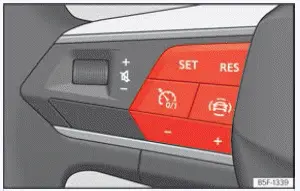
Fig. 99 On the multifunction steering wheel:
buttons to control the speed limiter.
Connecting
- Press the
 button.
Active speed limiting has not started yet.
Start regulation
- While driving, press the
 button.
Your current speed is saved as the target speed limit.
 + 1 km/h (1 mph)
 - 1 km/h (1 mph)
 + 10 km/h (5 mph)
 - 10 km/h (5 mph)
Interrupting the adjustment
- Press the
 button.
The set speed limit remains stored in memory.
Reinstating the cruise control
- Press the
 button.
The speed limiter becomes active again as soon as your Seat Arona is moving slower than the saved limit.
Switching off
- Press and hold the
 button.
The speed limiter turns off completely and erases the stored limit speed.
Switch to another driver assistance system
- Press the
 button.
- Check the status message on the instrument cluster display; the speed limiter switches off.
Troubleshooting
 The speed limiter is not
available
The warning lamp glows yellow.
- System fault: turn off the speed limiter and visit a specialist workshop for inspection.
Regulation is interrupted unexpectedly
- Electronic Stability Control (ESC) has been switched off.
- The brakes have overheated; allow them to cool down and test the system again.
- If the problem persists, contact a specialist workshop.
For safety reasons, the speed limiter only disengages completely once you lift off the accelerator pedal or turn the system off manually.
See also:
Tailgate Spoiler Replacement
Special Tools Required
KTC Trim Tool Set SOJATP2014
*Available through the Honda Tool and Equipment Program; call 888-424-6857
For Some Models
NOTE:
Take care not to scratch the bo ...
Spark Plug Inspection
Remove the ignition coils and the spark plugs.
Inspect the electrodes and the ceramic insulator:
Burned or worn electrodes may be caused by these conditions:
...
Auxiliary Input Jack
Use the jack to connect standard audio devices.
1. Open the AUX cover.
2. Connect a standard audio device to the
input jack using a 1/8 inch (3.5 mm) stereo
miniplug.
► The audio system a ...
Categories
