
Seat Arona: Troubleshooting
 The engine does not start
The indicator lamp illuminates in green.
The brake pedal is not pressed down, for instance when you attempt to move the gear selector lever.
- Depress the brake pedal before selecting a gear position.
 Selector lever lock
The control lamp flashes green.
The lock button on the gear selector lever is not pressed.
Forward movement is blocked until you engage the selector lever lock properly.
Messages shown on the instrument cluster display:
Clutch
 Clutch overheated Please
stop!
- The clutch has overheated and risks damage. Pull over safely, place the selector lever in P, and leave the engine idling so the gearbox can cool down. Once the warning lamp and message go out, have the Seat Arona checked and repaired by a qualified workshop without delay; if they stay on, do not keep driving and call for specialist help.
Faults in the gearbox
 Gearbox: Fault! Stop the
vehicle and
place the lever in P
- The transmission has detected a fault. Bring the vehicle to a safe stop, shift into P, do not continue driving, and seek specialist assistance.
 Gearbox: System fault! You
may continue
driving
- Have a qualified workshop diagnose and fix the fault promptly.
 Gearbox: System fault! You
can continue
driving with restrictions. Reverse gear
disabled
- Drive to a qualified workshop and have the transmission fault repaired.
 Gearbox: System fault! You
can continue
driving in D until switching off the engine
Stop the vehicle in a safe location and get specialist assistance.
 Gearbox: too hot. Adapt your
driving
accordingly
- Keep your speed down and drive gently; once the warning lamp turns off, you can return to normal driving.
 Gearbox: press the brake and
engage a
gear again
- If high gearbox temperature triggered the alert, this prompt appears once the transmission temperature drops back down.
Emergency mode
When all gear indicators appear on a light background in the instrument cluster, a system fault has occurred and the automatic gearbox switches to its backup programme. You can still drive at reduced speeds within a limited gear selection, though reverse gear may be unavailable.
Manual release of the selector lever
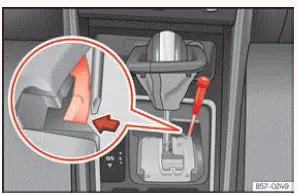
Fig. 88 Selector lever: manual release in the
parking position.
If a loss of electrical power during starting (such as a flat battery) leaves the lever locked in P, you can shift to N to move the car using an emergency release located under the centre console on the right side. Accessing and operating the release takes careful effort.
Removing the cover from the selector lever:
- Set the parking brake firmly.
- Gently lift the corners of the selector lever dust boot and work it upward over the shift knob.
Releasing the selector lever:
- Using the flat blade of a screwdriver, push the yellow release tab sideways and hold it in place ››› Fig. 88.
- Press the lock button on the selector lever and move the lever into position N.
- Once the emergency release is finished, fit the selector lever dust boot back onto the centre console trim.
WARNING
Never shift the selector out of P unless the parking brake is firmly set, and keep your foot on the brake pedal if there is any chance the vehicle could roll. Danger! Unintended vehicle movement can cause a crash or serious injury.
See also:
Audio Remote Controls
Steering Wheel Controls
Control basic audio system functions using the controls mounted on the
steering
wheel.
■MODE Button
Cycles through the audio modes as follows:
DISC mode appear ...
Controls Near the Steering Wheel
*1 : To use the horn, press the center pad of the steering wheel.
*2 : If equipped. ...
Clutch Clearance Inspection (A/T)
Special Tools Required
Clutch Compressor Attachment 07ZAE-PRP0100
Inspect the clutch piston, the discs, the plates, and the end-plate for
wear and damage, and inspect the clutch wav ...
Categories
