
Seat Arona: Turning off the engine. Electronic immobilizer
Turning off the engine
- Bring the Seat Arona to a complete stop.
- On manual gearboxes, push the clutch pedal all the way down; on automatic versions, move the selector lever into position P.
- Engage the parking brake firmly.
- Ignition lock models: turn the key back to position ››› Fig. 80 1.
- Start button models: give the start button ››› Fig. 80 a brief press to switch off the engine.
Emergency shutdown
If a short press of the start button does not shut the engine down when needed, perform an emergency shutdown:
- Press the start button twice within 3 seconds, or hold it pressed for longer than 1 second.
WARNING
Never shut off the engine while the vehicle is rolling; doing so can compromise control and lead to crashes and serious injuries.
- Airbags and seatbelt pretensioners remain inactive whenever the ignition is switched off.
- Brake servo assistance stops working as soon as the engine is off, meaning you must press the brake pedal with noticeably greater force to stop the car.
- Power steering assistance is unavailable without the engine running, making the steering wheel much heavier to turn.
- Switching off the ignition while moving can engage the steering column lock and make steering control impossible.
- Never pull the key out of the ignition switch while the vehicle is in motion, as instant steering lock engagement creates a severe accident hazard.
WARNING
Always carry the key with you when leaving the vehicle—especially when children remain inside, since they could start the engine or operate powered features like the electric windows and injure themselves.
NOTICE
- When the Start-Stop system stops the engine at a standstill, the ignition stays on; always switch the ignition off completely before leaving the vehicle so the battery does not drain.
- After sustained high-speed or heavy-load driving, heat soak can cause temperatures to rise once the engine is switched off; let the engine idle in neutral for around two minutes before shutting it down to help prevent heat damage.
Note
The radiator fan can continue running for several minutes after you switch the engine off—even with the ignition off—or switch back on if under-bonnet heat rises or direct sun warms the engine bay further.
Electronic immobilizer
The electronic immobiliser helps prevent unauthorized keys from starting the engine and stops the Seat Arona from being driven away without permission.
Each key contains an embedded transponder chip that automatically disarms the electronic immobiliser once a valid key is detected inside the cabin.
As soon as a valid key is no longer inside the vehicle, the electronic immobiliser arms itself automatically.
Because of this security check, the engine only starts using a properly coded genuine SEAT key, which can be ordered through an authorized SEAT dealer.
NOTICE
Using genuine SEAT keys ensures dependable, trouble-free operation of the locking and starting system.
Emergency starting function
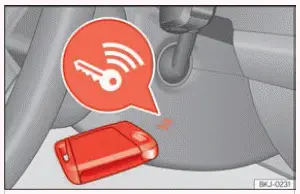
Fig. 82 On the right of the steering column:
emergency start.
When the system cannot detect a valid key inside the cabin, an emergency start procedure is required and a corresponding prompt appears on the instrument cluster screen. A depleted key fob battery is a common reason for this situation.
- Right after pressing the starter button, hold the key against the right-hand trim of the steering column ››› Fig. 82, positioning it as close as possible to the Kessy marking.
- The ignition switches on and the engine cranks and starts automatically.
See also:
Pairing a Phone
PHONE button
When no Bluetooth-compatible phone has ever been paired to the system, the
following screen appears:
1. Select Yes.
2. Put your cell phone in “Discovery”
or “Search” mode.
...
Editing Phone Information
PHONE button
► Phone Setup ► Add/Select a phone ► List
Edit the user name of a paired phone, and protect the phonebook and speed
dial
entries with a PIN.
1. Select a phone t ...
Activate and deactivate front passenger
airbag
Fig. 27 Switch for activating and deactivating
the front passenger airbag.
Fig. 28 Centre of the instrument cluster:
control lamp for deactivated front passenger
airbag in centre con ...
Categories
