
Seat Arona: Manual air conditioning controls / Heating and fresh air system
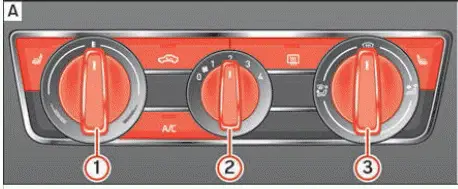
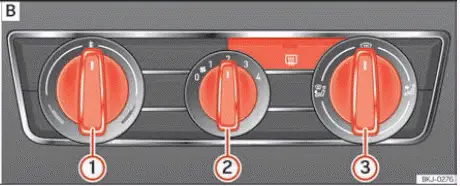
Fig. 79 In the centre A console: controls for the manual air conditioning; B
heating and fresh air system controls.
Cooling mode 
On manual air conditioning, press the button to turn cooling on or off.
Temperature 1
Turn the temperature dial to set your desired cabin warmth.
On the heating and fresh air system, cabin air cannot be cooled below outside air temperature because the system has no cooling or dehumidifying function.
Fan 
Turn dial 2 to set blower fan speed across the Seat Arona cabin.
At setting 0, both the blower and manual air conditioning are switched off, whereas setting 4 delivers maximum airflow.
Air distribution 
Turn dial 3 to send air where you want it inside the Seat Arona:
 Directs airflow toward chest level
 Directs airflow toward the footwells
 Directs airflow toward both the
windshield and the footwells
Defrost/demist function 
With manual air conditioning, turning control 3 to position  routes airflow onto the
windscreen while air recirculation turns off automatically or stays off; raise fan speed to clear fog from the
glass quickly, as cooling turns on automatically to dehumidify the air.
Rear window heating 
This function operates only with the engine running and turns off automatically after a maximum of 10 minutes.
Switch it off as soon as the rear glass clears, since lower electrical load supports better fuel economy.
To prevent potential battery damage, the Seat Arona can temporarily shut off rear window heating on its own and restore it once normal operating conditions return.
See also:
Home Addresses
INFO button
► Setup
►Personal Information►Home Address 1 or Home
Address 2
Set two home addresses that you frequently use.
1. Edit the name, address, and phone
number the s ...
Reset Factory Default Settings
INFO button
► Setup ►Other
►Reset Factory Default
Reset all the settings on the Setup screens to their factory defaults.
Select Yes.
The following settings are reset:
• Br ...
Navigation—Home Addresses and Going Home
The “Home” feature automatically routes you to your home address from any
location simply by selecting Go Home 1 or 2, or saying d “Go
Home.” You can store two home addresses as Home Addres ...
Categories
