
Seat Arona: Explanation of the function buttons. Initial configuration wizard
Explanation of the function buttons
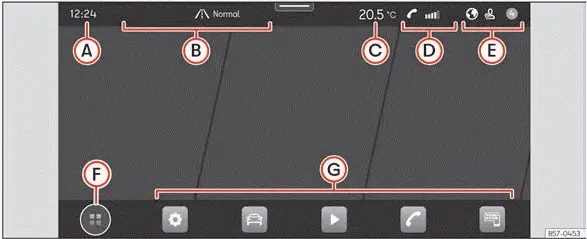
Fig. 11 Schematic representation: Overview of the possible function buttons on the screen.
Top part of the screen
- Current time.
- Drive profile and navigation information.
When a route is active, the display shows both estimated time and remaining distance to your destination. Without an active route, it shows the current drive profile, or your current street address on configurations without a drive profile option.
- Air conditioning information. On models equipped with steering wheel heating or windscreen
heating, an active indicator icon appears whenever those features are switched on.
When those heating functions are off, the current outside temperature is shown instead.
- Telephone information. Displays status details from your paired mobile phone, including cellular signal strength, active Bluetooth connection, missed calls, unread messages, and phone battery level.
- System customisation based on user and notifications. Selected preferences can be stored under individual user accounts within the personalization feature so they update automatically when you switch profiles.
Bottom part of the screen
Applies to the Connect System infotainment configuration.
- Main menu display mode:
 : main menu displaying six core
functions split across two pages (three per screen), which you can customize by pressing and holding or
tapping the function.
 : main menu arranged in tile view
showing every available infotainment function.
- Quick-access shortcuts for infotainment functions (up to ten shortcuts arranged in two rows of five, customizable by the user). Tap an icon to add or remove the corresponding function.
Initial configuration wizard
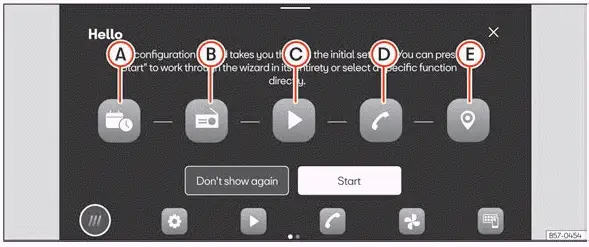
Fig. 12 Schematic representation: Initial configuration wizard
The initial configuration wizard guides you through first-time setup when you power on the Seat Arona infotainment system for the first time.
Each time you turn on the infotainment system, this setup screen appears ››› Fig. 12 if any required items remain
unset (indicated by " ") or if you have not yet selected the
Don't show again button.
Function buttons:
- Tap to configure the date and time.
- Tap to scan for and save radio stations offering the strongest reception at that moment.
- Tap to open Online Media configuration options.
- Tap to pair and connect your mobile phone with the infotainment system.
- Tap to set your home and work locations using your current GPS position or manual address entry.
Don't show again Prevents automatic reappearance of the setup prompts from this screen; if you want to run initial setup later, open it manually through Settings.
Start Launches the Configuration Wizard.
End Once at least one setting has been applied, tap to complete setup and return to the wizard's main overview.
 Closes the Configuration Wizard.
See also:
Playing M/WMA/AAC Discs
AUDIO button (in DISC mode)
► Folder
Change the folder on M/WMA/AAC discs that have tracks stored in a
folder
structure.
1. Select a folder.
► The system displa ...
Recommended CDs
• Use only high-quality CD-R or CD-RW discs labeled for audio use.
• Use only CD-R or CD-RW discs on which the recordings are closed.
• Play only standard round-shaped CDs.
A Dual-disc cann ...
Important Safety Precautions
You’ll find many safety recommendations throughout this section, and throughout
this manual.
The recommendations on this page are the ones we consider to be the most important.
Always Wear Your ...
Categories
