
Honda Fit: iPod®/USB Flash
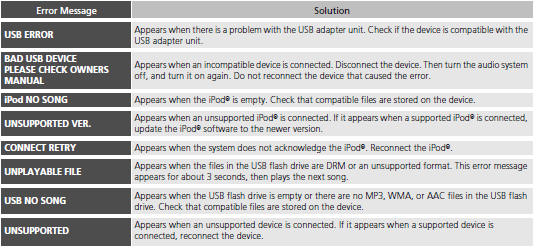
If an error occurs while playing an iPod® or USB flash drive, you may see the following error messages. If you cannot clear the error message, contact a dealer.
See also:
Dust and Pollen Filter Replacement
Open the glove box. Remove the glove box stop on each side, then
let the glove box hang down.
Pull the dust and pollen filter assembly (A) out from the blower unit.
...
Radio Theft Protection
Your vehicle’s audio system will disable itself if it is disconnected from electrical
power for any reason.
To make it work again, you must enter a specific five-digit code in the preset
button ...
Front Individual Map Light Test/Replacement (With Navigation)
With navigation
Turn the individual map light switch OFF.
Carefully pry the lens (A) off with a small screwdriver.
Individual Map Light:
8 ...
Categories
