
Honda Fit: Using Call History
 PHONE button
► Call History
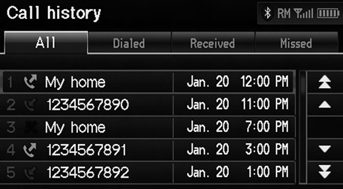
1. Select a call.
Select All, Dialed, Received, Missed to view the call history by category.
2. Select Call to begin dialing.
The call history shows the last 20 calls from your phone.
See also:
Recommended Engine Oil
• Genuine Honda Motor Oil
• Premium-grade 0W-20 detergent oil with an API Certification Seal on the
container.
Oil is a major contributor to your engine’s
performance and longevity. If you ...
Manual transmission models Shifting
■Shift Lever Operation+
Fully depress the clutch pedal to operate the shift lever and change gears,
then
slowly release the pedal.
Depress the clutch pedal, and pause for a few seconds be ...
Checking Tires
To safely operate your vehicle, your tires must be of the proper type and
size, in
good condition with adequate tread, and properly inflated.
■ Inflation guidelines
Properly inflated tire ...
Categories
