
Honda Fit: Checking the Battery
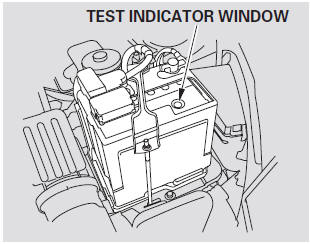
Check the condition of the battery monthly by looking at the test indicator window. The label on the battery explains the test indicator’s colors. The test indicator window’s location differs according to the battery manufacturer.
Check the terminals for corrosion (a white or yellowish powder). To remove it, cover the terminals with a solution of baking soda and water. It will bubble up and turn brown. When this stops, wash it off with plain water. Dry off the battery with a cloth or paper towel. Coat the terminals with grease to help prevent future corrosion.
If additional battery maintenance is needed, see your dealer or a qualified technician.
WARNING:
Battery posts, terminals, and related accessories contain lead and lead compounds. Wash your hands after handling
If you need to connect the battery to a charger, disconnect both cables to prevent damaging your vehicle’s electrical system. Always disconnect the negative ( - ) cable first, and reconnect it last.
If your vehicle’s battery is disconnected, or goes dead, the time setting is lost.

The battery gives off explosive hydrogen gas during normal operation.
A spark or flame can cause the battery to explode with enough force to kill or seriously hurt you.
Wear protective clothing and a face shield, or have a skilled technician do the battery maintenance.
If your vehicle’s battery is disconnected, or goes dead, the audio system may disable itself. The next time you turn on the radio, you will see ‘‘ENTER CODE’’ in the frequency display. Use the preset bars to enter the code.
See also:
HFL Menus
The ignition switch must be in ACCESSORY
or ON
to use HFL.
To use HFL, you must first pair your Bluetooth-compatible cell phone to the
system while the vehicle is parked.
Phone Setup
&# ...
Day or Night Mode
Press the (Display mode) button
to manually switch between day and
night mode.
...
Audio Antenna
Your vehicle is equipped with an antenna at the rear of the roof . Bef ore
using a ‘‘drive-through’’ car wash, remove the antenna by unscrewing it by hand.
This prevents the antenna f ...
Categories
